Writing a newsletter
Newsletter → Newsletter → Create
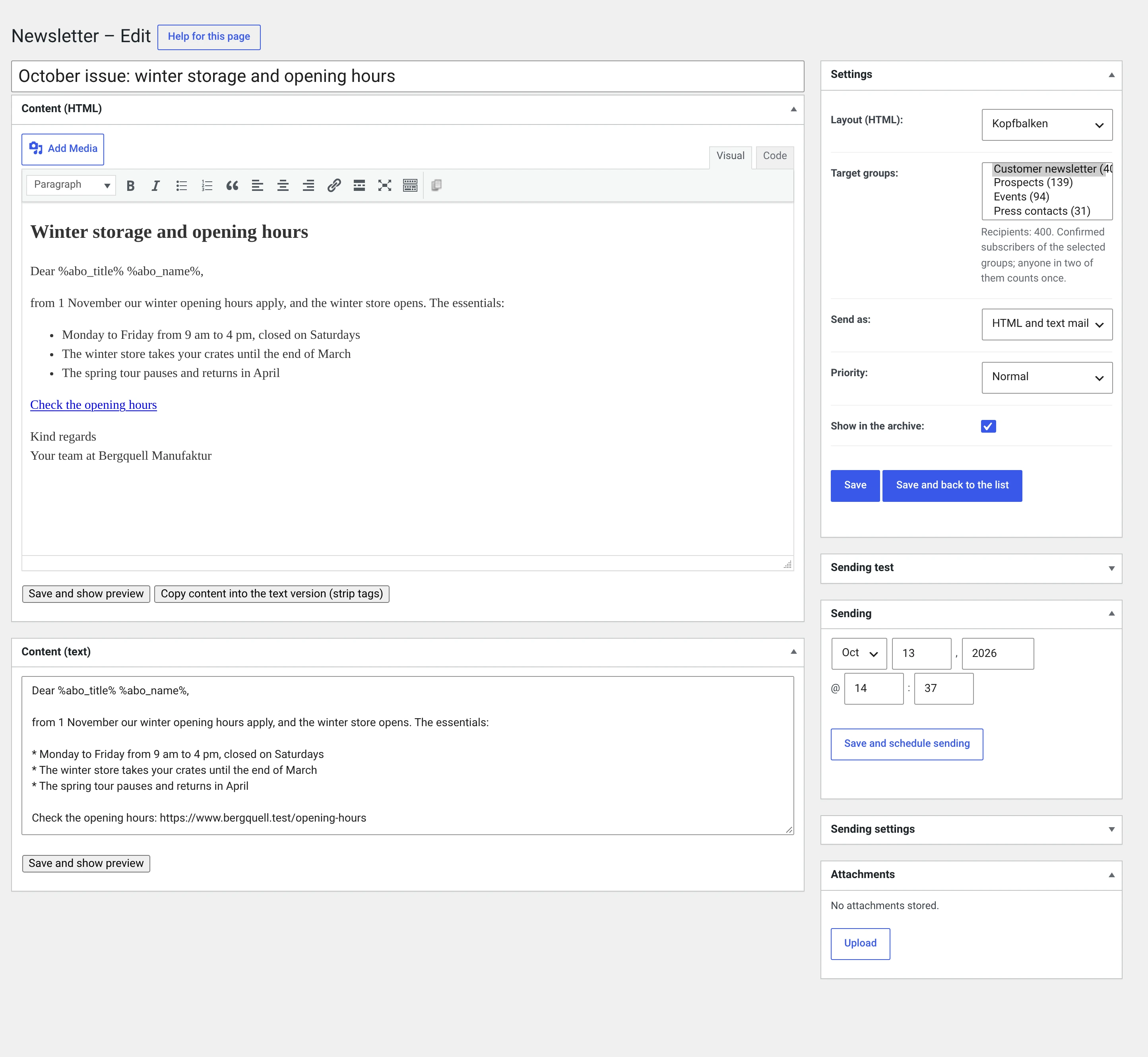
The form has two columns: the content on the left, everything to do with sending on the right. You can save at any time; as long as you do not click Schedule sending, nothing goes out.
Left: the content
Name of the newsletter
The field at the very top, where a post would have its title. It is an internal name — it appears in the list and in the delivery log, not automatically in the mail.
It can still end up in the mail: the subject is %nl_name% out of the box,
and the Kopfbalken template writes it into the coloured bar. So name the
newsletter the way the subject line should read — „September issue: apple
juice from the region", not „NL 09/2026".
Content (HTML)
The WordPress editor, the same one as for a post: Visual for writing, Code for the HTML.
Only the content goes here, not the whole mail. Header, footer, logo, unsubscribe link and legal details come from the template and therefore appear in no editor.
Three things that are different in a mail than on a website:
- No flexbox, no grid, no external stylesheets. Outlook renders with the Word engine and ignores all three. If you need columns, use a table — or the Zweispaltig template.
- Images need
widthandheightas attributes. Amax-widthin thestylealone makes Outlook draw the image at full pixel width. - Write every link out in full, with
https://and domain. A path like/offerleads nowhere in a mailbox.
There are two buttons below the editor:
| Save and show preview | Opens the finished mail in a new window — content in the template, placeholders resolved. Only possible after the first save |
| Copy content into the text version (striptags) | Takes the HTML, strips the markup and writes the result into the text field below. Existing text is overwritten — you are asked first |
Content (text)
The version for mail programs that show no HTML, and for everything that reads
a mail mechanically. It is sent as text/plain, unchanged: a line break is
a line break, HTML would be visible gibberish here.
Do not leave it empty. A mail without a text version is a signal to spam filters, and it costs nothing to press Copy content into the text version and read through the result.
Clicks are not counted in the text version
Click tracking rewrites only the links of the HTML version. In the text version your addresses appear exactly as you wrote them — a tracking address is long and meaningless, and anyone having to type it out would get nowhere.
Right: settings
Layout (HTML)
The template your content sits in. What is preset here comes from Defaults; for this one issue you can deviate.
Target groups
Who receives the newsletter. Multiple selection with Ctrl (Mac: Cmd). The number in brackets is the count of confirmed subscribers per group.
Below the list is the number of recipients. It is not the sum of the brackets: anyone in two selected groups counts once and receives the mail once.
Without a group, nothing happens
A newsletter without a target group can be saved but not scheduled. Only subscribers with the status Active count — anyone waiting for confirmation or inactive receives nothing.
Send as
| HTML and text mail | Default, and right in almost every case. The mail program takes what it can handle |
| HTML mail | HTML only. For those who do not want to maintain the text version — at the price of being unreadable for some recipients |
| Text mail | Text only. No template, no logo, no open tracking |
Priority
Ends up as a header in the mail. Most mail programs show it as an exclamation mark, some not at all. It changes nothing about the sending — in particular it is not an order in the queue.
Leave it on Normal. „Very high" on a newsletter is a bad sign to spam filters.
Show in archive
Whether the newsletter is listed on the archive page after sending. The checkbox controls the list only: the „View this newsletter in your browser" link from the mail works in every case — whoever received the newsletter may also read it again.
This is the only checkbox that can still be changed after sending.
Right: sending settings
Four fields that override the global defaults from Sender and subject for this one issue. Leaving one empty means: the default applies.
| Field | |
|---|---|
| Subject | %nl_name% out of the box. Placeholders are allowed |
| Sender | Name <address@your-domain.test>. The address must belong to your domain |
| CC | Goes out with every mail. Visible to the recipient — with a newsletter, almost never what was meant |
| BCC | A silent copy per mail. With 400 recipients, that is 400 copies |
What the plugin checks before anything goes out
When you open a newsletter that has not been sent, on a test send and when scheduling, the plugin checks two things and reports them at the top of the form:
Placeholders nobody resolves. Subject, text and HTML version are run
through the replacement once; whatever is still standing there as %name%
afterwards will reach the recipient exactly like that.
This newsletter contains placeholders that nobody resolves:
%abo_vname%.
That is either a typo — it is called %abo_vorname% — or the module that
brings the placeholder along is not running.
Files belonging to a module that is not running. If attachments hang on this newsletter but the Attachments module is switched off, they will not go out. That too appears as a message there.
Both messages disappear by themselves once the cause is fixed. They prevent nothing — you can send every newsletter unchanged.
The next issue
The quickest way to the next issue is Copy in the list: content and target groups are carried over, and the new newsletter is a draft.