Import and export
Newsletter → Subscribers → CSV import and CSV export respectively.
Both work with a CSV file. You set the separator under General; out of the box it is the semicolon, because that is what Excel expects with German settings.
Export
One click and you get a file wpng-abonnenten-<date>.csv with all
subscribers — not just the page on screen and not just the filter currently
set.
The columns:
| Column | |
|---|---|
id |
The subscriber's number |
cdate |
When the subscription came in |
title, vname, name |
Salutation, first name, last name |
email |
|
strasse, plz, ort |
Street, post code, city |
status |
0 inactive · 1 waiting for confirmation · 2 active |
optin_time |
When it was confirmed |
groups |
The IDs of the groups, comma-separated |
uf_<number> |
one column per subscriber variable |
Why some fields start with an apostrophe
Excel and LibreOffice evaluate a field that starts with =, +, -
or @ — even from a CSV file. The subscriber list holds names from a form
on your website, that is, input from strangers. A first name
=HYPERLINK("http://evil.test","Important") would be a link in your
spreadsheet that you believe you built yourself.
That is why the export puts an apostrophe in front. On import the plugin takes it off again: what is exported and read back in comes back unchanged.
Numbers are left alone. A telephone number +49 170 … does get the
apostrophe — to Excel it is already a formula today and would otherwise
sit in the cell as #NAME?.
The export contains no newsletters. It contains addresses. For a complete backup you need a database dump.
Import
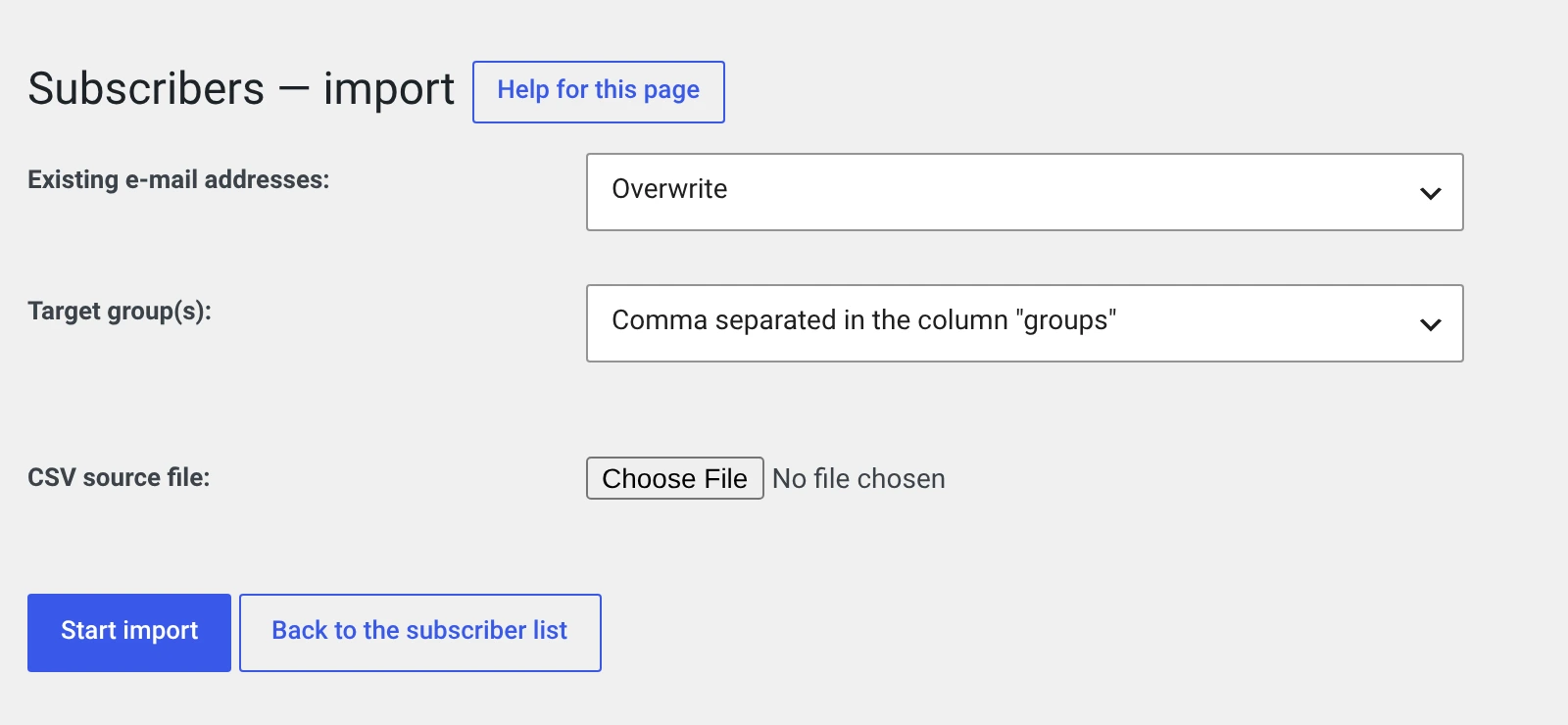
The file
A CSV file with a header row. The header decides which column goes where; the order does not matter, and unknown columns are skipped.
Recognised are: id, title, vname, name, email, strasse, plz,
ort, status, optin_time, groups and uf_<number>.
email is the only mandatory column. A row without it is skipped.
email;vname;name;title;status;groups
anke.brandt@post.test;Anke;Brandt;Frau;2;1,3
jens.kern@mail.test;Jens;Kern;Herr;2;1
Download the example file — three rows with every column, UTF-8, semicolon as the separator.
An empty column is not the same as a missing one. Leave out a column you
do not need. If you put optin_time in the header and leave the field below
it empty, a strictly configured database rejects the row.
The easiest way to a correct file
Export first. The file that comes out has exactly the header the import expects — change it and play it back.
cdate is the one column the import does not read: the subscription
date of a new entry is the date of the import.
Existing e-mail addresses
| Overwrite | An existing entry with the same address is updated |
| Ignore | The row is skipped, the existing entry stays |
The comparison is case-sensitive: Anke@post.test and anke@post.test
count as two different addresses.
Target groups
| Choice | What happens |
|---|---|
| Comma-separated in the „groups" column | The groups from the file. The subscriber's previous assignments are replaced |
| Specify manually | The groups chosen below. Previous ones are replaced |
| Specify manually (add groups) | The groups chosen below are added, previous ones stay |
Two of the three routes replace
Only „add groups" leaves existing assignments in place. With the other two a subscriber who was in three groups loses two of them if the file names only one.
The groups column holds IDs, not names — a number that matches no
group is dropped.
The status
If the status column is not in the file, new subscribers get the value
0 — that is, Inactive. They then receive no newsletter.
That is the most common surprise on import. Set status to 2 if the
addresses are confirmed — and only then.
An import is not consent
For every imported address you need proof that the person consented to receiving mail. The import writes no consent record: the plugin does not know what was consented to, or when.
Keep the proof from the old system — export of the sign-up data, date, wording. More under Consent.
If you have no proof, the honest route is to import the list with
status=1 and ask for confirmation through the bulk action Send opt-in
mail again. You will lose addresses in the process — but the ones that
stay will hold up.
After the import
A message appears such as „327 subscribers were imported." and „12 subscribers were updated."
Then check:
- Unassigned in the subscriber list — if a lot of people suddenly sit there, the group assignment did not arrive.
- The status filter — if everything is under Inactive, the
statuscolumn was missing.
If the import does nothing
| Message | Cause |
|---|---|
| „Please specify a CSV file!" | The file is not named .csv, or it was too large for the upload |
| „CSV file could not be loaded!" | The file is empty or the separator does not match — check General |
| „No subscribers were imported or updated." | No email column, or all addresses existed and Ignore was set |
Character set. Save the file as UTF-8. Excel offers „CSV UTF-8 (comma
delimited)" for that. With the wrong encoding, umlauts arrive in the database
as ä — and that can only be straightened out by hand afterwards.
Try five rows first
Create a file with five addresses and import that one first. Check in the list whether umlauts, groups and status are right. Only then the whole file.
And make a database backup beforehand. An import cannot be undone.