Spam protection
Newsletter → Configuration → Modules → Spam protection
Protects the subscribe and unsubscribe form against automated sign-ups — without picture puzzles, without a third-party service and without a single stored IP address. Normally a visitor notices nothing at all.
New in 2.0, in both packages.
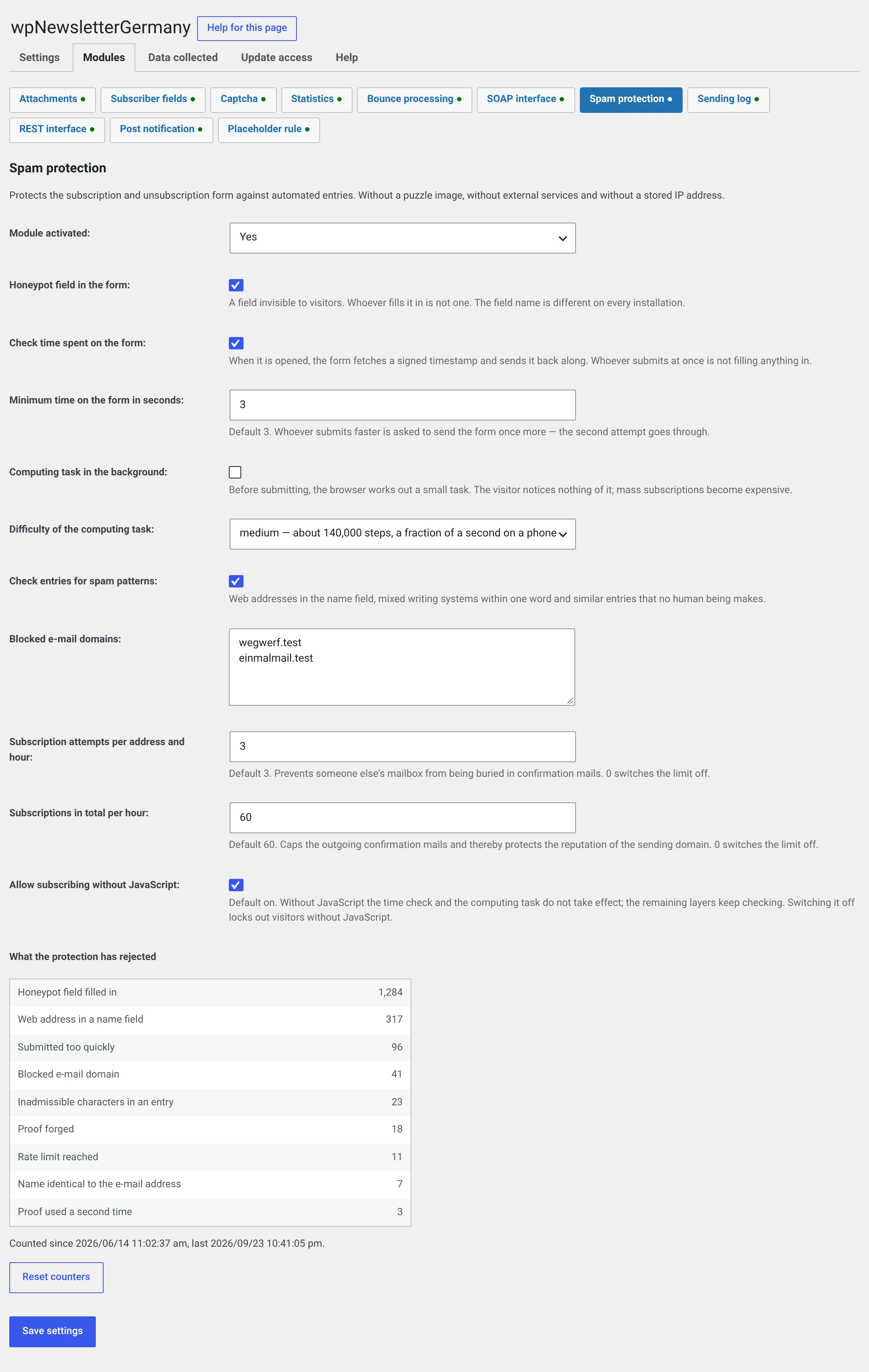
Switch the module on and leave the defaults alone
The default suits almost every website: three layers on, the fourth off. If sign-ups still get through, add the proof-of-work — not before.
What it lets you switch off
The captcha module with Google reCAPTCHA. And that is the real point:
| Spam protection | Google reCAPTCHA | |
|---|---|---|
| Third-party service | no | yes, Google LLC |
| Visitor's IP address | neither stored nor transmitted | goes to Google |
| Consent required | no | yes |
| Own section in the privacy policy | no | yes |
| Visible to the visitor | no | yes |
The five layers
They run one after another. Four of them a visitor never notices.
| Layer | What it checks | Default |
|---|---|---|
| Honeypot field | An invisible field nobody can fill in | on |
| Dwell time | Was the form opened, and did time pass between opening and submitting? | on |
| Proof-of-work | Did the browser compute something first? | off |
| Content check | Is there anything in the fields that no human would enter? | on |
| Rate limit | How many sign-ups came in this hour? | on |
Honeypot field in the form
A text field invisible to visitors. Anyone who fills it in is not one.
The field name is different on every installation — it is derived from your installation's security key. A program waiting for a fixed name comes up empty.
It is hidden three times over: on the element itself, through a class and for screen readers. The first is not decoration — if a theme overrides the plugin's stylesheet, there would otherwise be a visible field in exactly that place, silently discarding every sign-up.
Check the dwell time
When loaded, the form fetches a signed timestamp and sends it back. Anyone submitting instantly has not filled anything in.
Minimum dwell time in seconds — default 3. Anyone submitting faster is asked to submit the form once more; the second attempt goes through.
Why the timestamp is not in the HTML
Because your page may sit in a cache. It would then carry the moment the cache was filled — which is hours old by the time the visitor sees it.
The field therefore goes out empty and is filled in by the browser. For you that means: the form may sit on a busy, cached page without any problem.
Proof-of-work in the background
Off out of the box. Before submitting, the browser looks for the solution to a small computational puzzle. The visitor notices nothing — the computation happens while they fill in the form. For a program trying to send a thousand sign-ups it becomes expensive.
| Level | Computation steps | On a phone |
|---|---|---|
| low | about 22,000 | imperceptible |
| medium | about 140,000 | a fraction of a second |
| high | about 1.2 million | several seconds |
Anyone submitting before it is done waits at most eight seconds and is then asked to try again.
When you should switch this on
When sign-ups get through despite the other layers. Not before: the puzzle costs computing time on your visitor's device, and three layers are enough as a rule.
Medium is the right place to start. High is noticeable on an old phone.
Check input for spam patterns
Four rules on salutation, first name, last name, street, post code and city:
| Rule | Why |
|---|---|
| A web address or BBCode in a name field | The most common pattern of all: the entry is not made to receive the newsletter but so that you see the link in your backend |
| Control characters in a single-line field | Line breaks are the classic attempt to smuggle extra headers into a mail |
| Two writing systems within a single word | A Cyrillic М in Мüller, say. Across word boundaries nothing is checked: a Greek surname next to a German first name is fine. Umlauts are Latin and trigger nothing |
| First name, last name and the part before the @ all identical |
This layer is the only one that reports visibly and names the field. Discarding silently would be wrong here — it could hit somebody whose town is called „St. Peter-Ording", and they would never learn what went wrong.
Blocked e-mail domains — one domain per line. Blocked is the domain itself
and everything below it: blocking throwaway.test also blocks
mail.throwaway.test.
Rate limit
Two counters, each with a window of one hour:
| Setting | Default | Against what |
|---|---|---|
| Sign-up attempts per address and hour | 3 | Burying somebody else's mailbox in confirmation mails |
| Total sign-ups per hour | 60 | Losing the reputation of your sender domain through mass sending |
0 switches the respective limit off.
The per-address counter matters mostly when unsubscribing: when subscribing, only one confirmation mail per address can go out anyway, the second is caught by the duplicate check. When unsubscribing, the mail goes to somebody already on the list — and it goes again on every submit.
No IP address, not even a hashed one
That costs precision: anyone spreading across many addresses only hits the total counter. In exchange, not a single record describing a visitor comes into being.
Allow sign-up without JavaScript
On by default. Without JavaScript, dwell time and proof-of-work do not apply; the other layers keep checking.
Switching it off locks out visitors without JavaScript. There are few of them — but they also include screen readers, old devices and people with strict browser settings.
What the visitor gets to see
| Case | Answer |
|---|---|
| Honeypot filled in | The success message. Nothing is stored |
| Proof forged, from the future, unusable or used twice | the same |
| Proof-of-work solved incorrectly | the same |
| Submitted too quickly | „That was too quick for us. Please submit the form once more." |
| Form open for over an hour | „The form was open for too long. Please submit it once more." |
| (not from the spam protection) Page cached for over a day | „The form had expired. Please submit it once more." — see Subscription form |
| Proof-of-work not finished yet | „The check in the background was not finished yet. …" |
| No proof, and „without JavaScript" is off | „JavaScript is required for signing up. …" |
| Content check | names the field |
| Blocked domain | „We do not accept sign-ups from this e-mail domain. …" |
| Rate limit reached | „There have been a great many sign-ups just now. Please try again in an hour." |
The line is drawn deliberately: what cannot be an accident is discarded silently — anyone who notices they have been caught will try another way. What can hit a human being gets a sentence that says what to do.
The counters in the module form
At the bottom of the module page is What the protection rejected — one number per reason for rejection, plus the period.
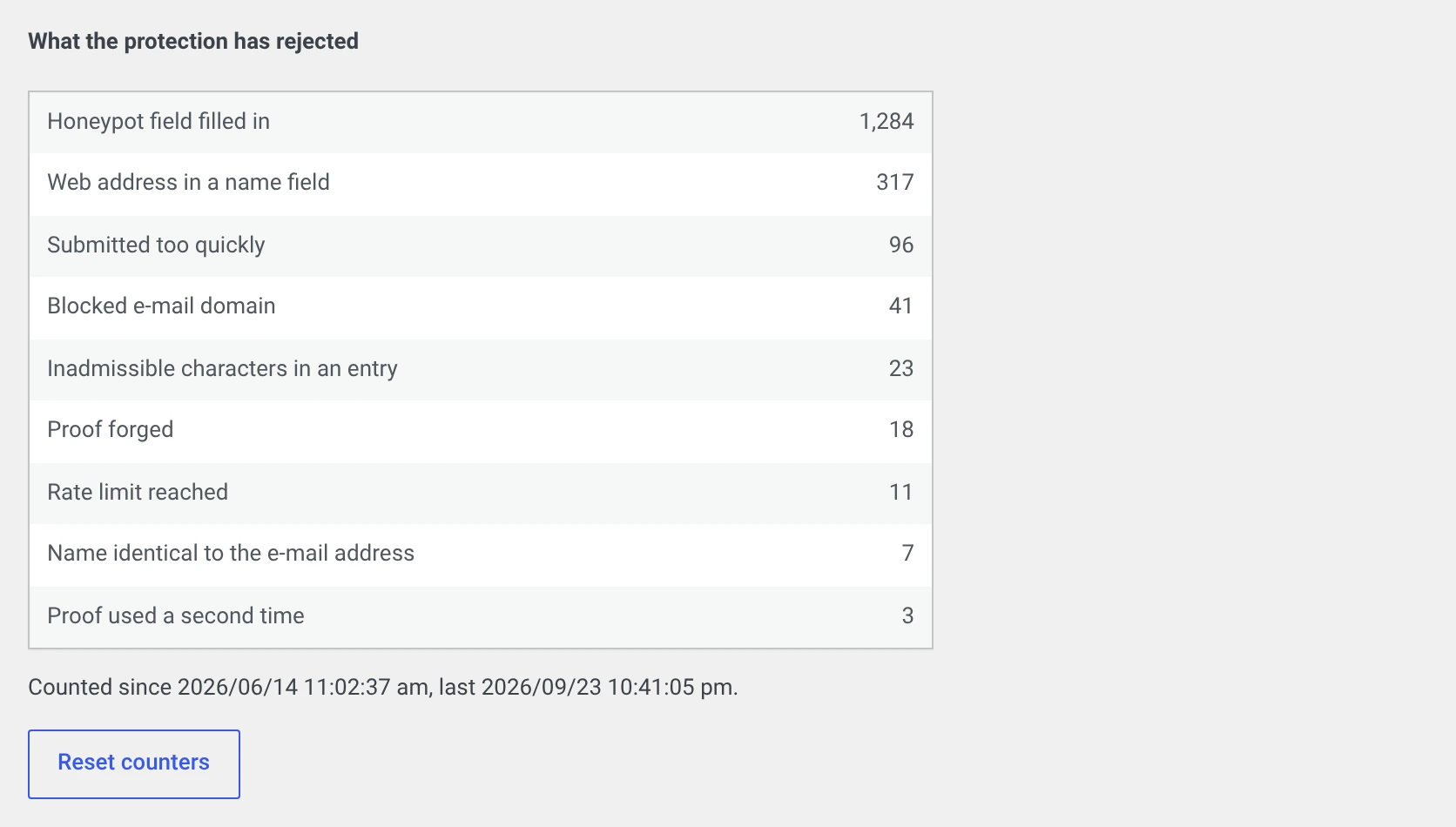
How to read them:
| What is at the top | What that means |
|---|---|
| Mostly honeypot filled in | Simple programs. The protection is doing exactly what it should |
| Mostly web address in a name field | Somebody wants to place links in your backend |
| A lot of submitted too quickly | Either programs, or your minimum dwell time is too high. With real visitors a second, successful attempt follows |
| Rate limit reached in large numbers | A targeted rush. Now is the moment for the proof-of-work |
| Zero everywhere | Either the module has not been active for long, or things are quiet. Both are good |
Reset counters sets them to zero — useful for seeing the effect of a change.
The counters contain numbers only. No address, no input, nothing that describes a visitor.
What the module changed about unsubscribing
Up to 1.1.4 the unsubscribe path ran with no check at all — and the answer „No subscriber with this e-mail address was found" answered, for any address at all, the question of whether it is on your list.
Since 2.0 the answer is neutral: the same message, the same destination page, whether the address is on the list or not.
For operators with the captcha module active
From 2.0 the captcha check applies when unsubscribing too. The field was always in that form — it is the same form — it was simply never checked.
If you have your own form template
If you have register/index.php or register/kompakt.php in your theme
or in your own templates, it needs the line
<?php $this->callMods( 'register_form' ); ?>
Without it, the honeypot field and the time proof do not make it into the form. Nobody is rejected because of that — a missing proof is treated like a sign-up without JavaScript — but then only the content and the rate are checked.
If you override the plugin's stylesheet, you should carry over the class
.wpng_botsperre. It is not mandatory, the field also hides itself.
What has to go into your privacy policy
Little, and that is the whole point of the module. What is stored is only:
- the hash of a used proof, for at most one hour. It cannot be linked to any visitor: the token contains nothing but a time and a random value;
- two counters, for at most one hour. One sits under the checksum of the e-mail address entered, the other under a fixed name. Both contain a number;
- the statistics: one number per reason for rejection. No personal reference.
No IP address, no user agent, no identifier in the visitor's browser, no call to a foreign server.
A suggested wording, if you want to mention it anyway:
Our subscription form is protected against automated sign-ups. We check technically whether the form was filled in by a browser, and we limit the number of sign-ups per hour. Neither your IP address nor any information about your device is stored for this, and no data is transmitted to third parties.
The suggestion is no substitute for legal advice.