Sending and scheduling
A newsletter never goes out to everyone at once. It is scheduled, and a cron works through the queue in portions. That is not red tape but the condition under which 5,000 mails do not kill a shared hosting package.
Everything for it sits in the right-hand column of the newsletter form.
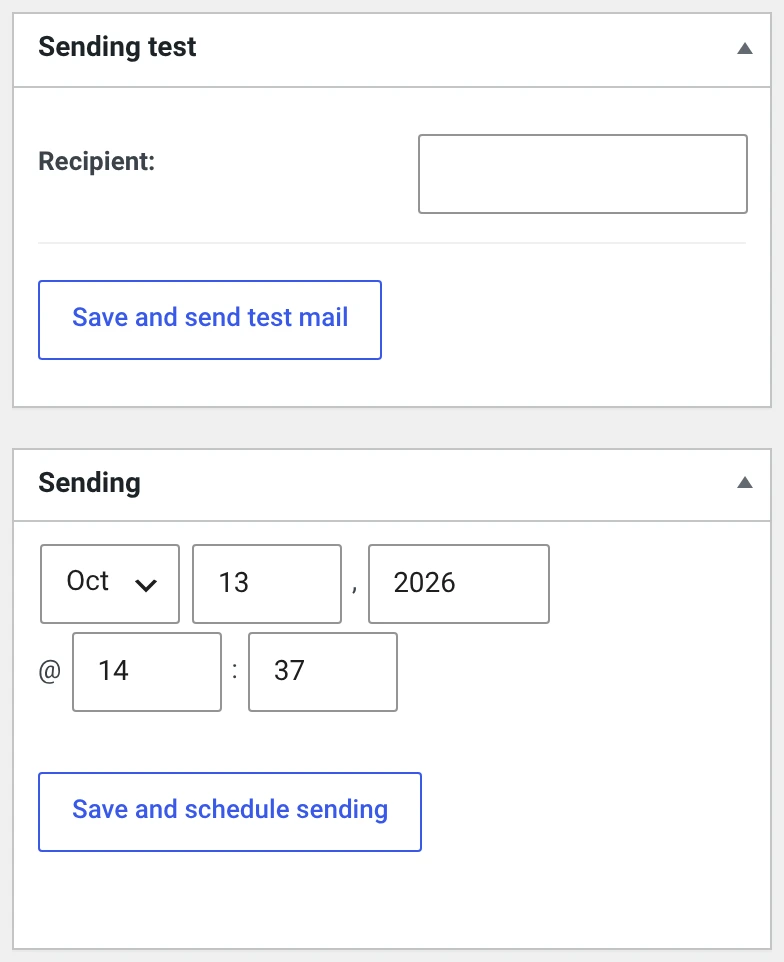
1. Test send
Right-hand column, box Test delivery.
Enter one or more addresses, separated by commas, and click Save and send test mail.
The test mail is not a preview but the real thing — the same template, the same placeholders, the same mail. Which is why it also looks personal:
Which subscriber the test mail is rendered with
If the test address is in your subscriber list, the mail is rendered with
that subscriber's data — %abo_vorname% then shows their first name,
and the unsubscribe link is theirs and works.
If it is not in the list, the personal placeholders stay empty. A test send to an unknown address therefore does not show you whether the salutation is right.
The advice that follows: enter yourself as a subscriber and test to that address.
What you should check on a test send:
| Does the mail arrive at all? | If not, it is the mail route and not the newsletter |
| Does it land in spam? | Then check the sender address, SPF and DKIM, not the text |
| Is the salutation right? | See above |
| Does the unsubscribe link work? | Actually click it. It is mandatory |
| Are your legal details in the footer? | Every template has an italic placeholder sentence there that wants replacing |
| Does the mail look right on a phone? | Half of your recipients read it there |
Test mails do not count in the statistics and appear in no delivery log.
2. Set the date
Right-hand column, box Delivery. Day and time in your website's time zone.
A date in the past means „as soon as possible" — at the next cron run.
3. Schedule the send
Save and schedule sending.
This is the moment when the decisive thing happens: the plugin determines the recipients and writes one row per recipient into the queue. After that it is settled who gets this issue.
Sending scheduled for 440 recipients.
| Who is determined? | All subscribers of the chosen groups with the status Active |
| Duplicates? | Anyone in two chosen groups receives the mail once |
| Someone subscribing afterwards? | Will not get this issue |
| Someone unsubscribing afterwards? | Still gets it if their row has already been processed — otherwise not |
The newsletter is locked from now on: name, content and target groups can no longer be changed. Only the Show in archive checkbox stays movable.
4. The send is running
On each run the cron takes as many rows from the queue as Sending settings allows under Newsletters sent per run — 200 out of the box.
In the newsletter list you can see the progress:
200 / 440 subscribers have received the newsletter
You can trigger the send by hand: the Start sending button in the form. It too processes only one portion, not everything.
If the progress stalls
Then the cron is not running. WP-Cron depends on page views — on a site nobody visits, nothing happens. Sending settings shows when it last ran. If the value stays old, set up a real cron job; path and address are on the same page.
Cancelling
Cancel sending / Reschedule in the form puts the newsletter back to draft.
- Mails already sent stay sent. A mail cannot be recalled.
- Those not yet sent will not go out.
- The newsletter is editable again and can be scheduled anew. The recipient list is then determined afresh.
That is the emergency exit for when you notice a mistake after scheduling. The shorter the time since the date, the less is already out.
What goes into the mail
Every mail is assembled from three parts:
┌─ Template (layout) ───────────────┐
│  header, logo, „view in browser"  │
│  ┌─ your content from the editor ┐│
│  │                               ││
│  └───────────────────────────────┘│
│  footer, legal details, unsubscribe│
└───────────────────────────────────┘
        ↓ replace placeholders per recipient
        ↓ modules (tracking pixel, click links, attachments)
        ↓ mail route
Rendering happens per recipient — which is why every mail can carry a different name and a different unsubscribe link.
Images in the mail
Out of the box, images are linked: the mail program loads them from your server. Many mail programs block that at first and show „display images".
Under Sending settings you can switch on Embed images in mail. The images then travel inside the mail and are visible straight away.
| Linked (default) | Embedded | |
|---|---|---|
| Size of the mail | small | larger by the images |
| Visible immediately | no | yes |
| Open tracking | works | stops working |
The last point is the catch: the tracking pixel of the Statistics is an image that has to be loaded. If it is embedded along with the rest, nobody loads anything any more, and no open is counted. If you want both, you have to choose.
An image that should stay excluded gets class="noreplace".
The two mail routes compared
Configured under Sending settings.
| WP mailer (default) | PHP mailer | |
|---|---|---|
| Sends via | wp_mail() — the route your website takes anyway |
its own connection, optionally over SMTP |
| SMTP plugin | applies, the newsletter goes over its connection | does not apply |
| Credentials | in the SMTP plugin | in this plugin, password encrypted |
| Priority of the newsletter | is not set | is set as a header |
| „HTML and text mail" | sends both parts | sends both parts |
| Embedding images | works | works |
One peculiarity of the WP mailer
An SMTP plugin can override your sender. wp_mail() applies the
filters wp_mail_from and wp_mail_from_name after reading the sender
header. If another plugin sets those filters — many SMTP plugins do — its
address wins. If the mailbox shows a different sender than you configured,
that is the cause.