REST interface
Only in the Pro and Enterprise editions
Newsletter → Configuration → Modules → REST interface
A third-party system can read and create groups, create, find, change and assign subscribers to a group — over HTTP, without an additional PHP extension.
New in 2.0. Since 2.0.1 a third-party system can also subscribe someone the way a visitor does at the form: with a confirmation mail, a consent record and everything that goes with it.
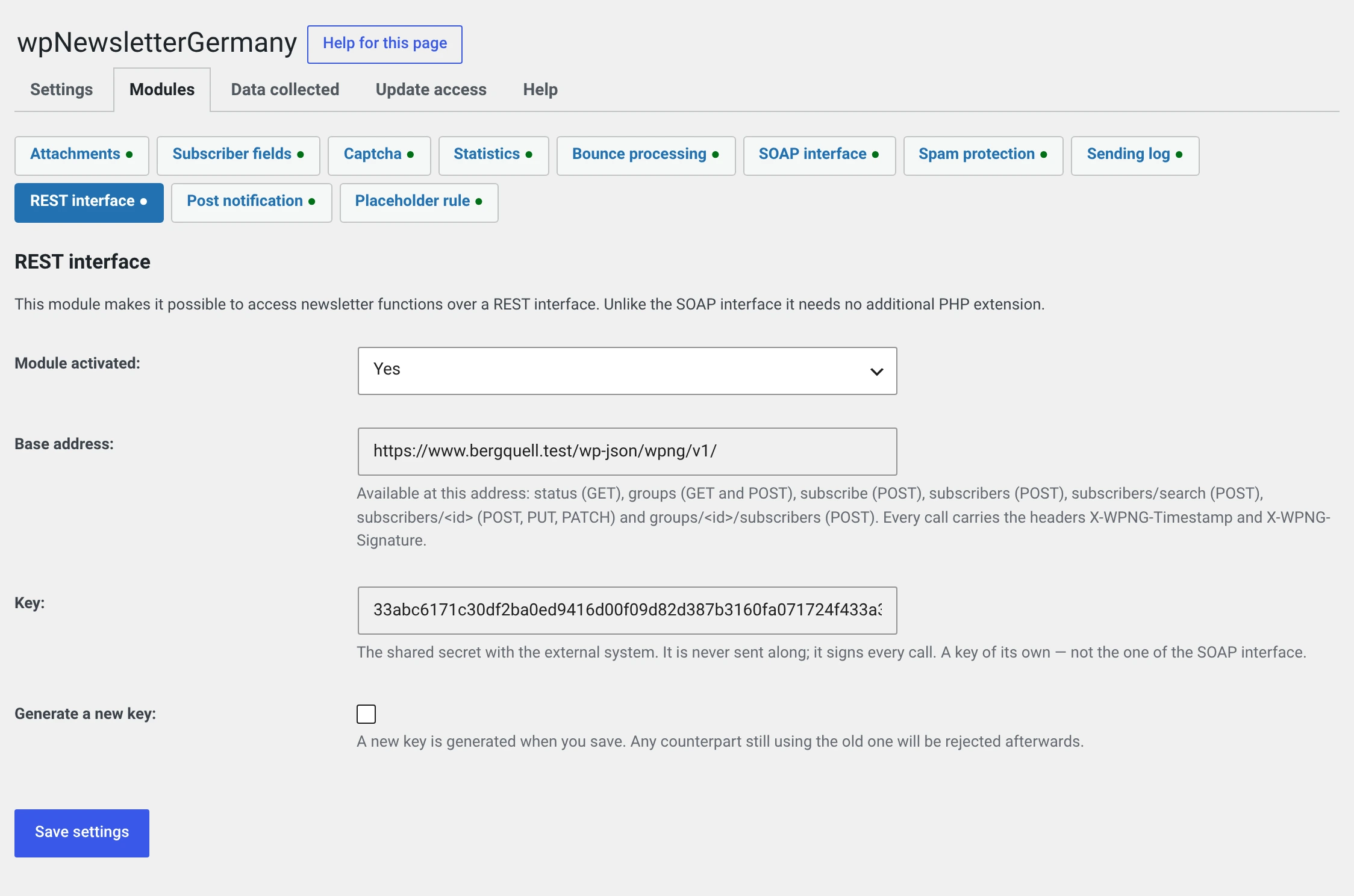
It sits next to the SOAP interface, not in its place: its own switch, its own key, its own files. Switching SOAP off changes nothing about REST, and the other way round.
For a new integration, REST is the right choice.
The address
It is shown on the module page. Which form applies depends on your installation's permalinks:
with pretty permalinks    https://your-domain.test/wp-json/wpng/v1/status
without                   https://your-domain.test/?rest_route=/wpng/v1/status
If the module is off, the address answers with rest_no_route — no route is
registered at all then.
The key
A key of its own, not the SOAP one. It is created from random values when you switch the module on, appears on the module page as 64 hexadecimal digits and can be regenerated there.
You cannot type it in
A value chosen by hand would be the one place where the interface would be weaker than it looks.
Generate a new key rejects every counterpart still using the old one. Agree it beforehand.
With Settings backup it only comes along if you set a password — it is in the Secret class.
Over http the contents go in clear text
The signature protects the key, not the mail addresses and names in the
call. The module page points this out if your installation does not run
over https.
For your developers
Authentication
Every call carries two headers:
| Header | Content |
|---|---|
X-WPNG-Timestamp |
Unix time of the call |
X-WPNG-Signature |
HMAC-SHA256 in lower-case hexadecimal digits |
What is signed is what makes up the call, separated by \n:
1. HTTP method in upper case              GET, POST
2. route with a leading slash             /wpng/v1/groups
3. query part, sorted by key              without parameters, an empty line
4. the Unix time from X-WPNG-Timestamp
5. the body, character for character
The body is included, and that is the point: the old SOAP signature covered only the names of the parameters, not their values.
Time window: 900 seconds. If the counterpart's clock runs differently,
GET /status reports the installation's time.
What the installation appends itself does not count. Three query
parameters are removed before signing: rest_route, _locale and
wpng_quotecheck. All three depend on the installation, not on the caller —
if they were in the signature, the counterpart would have to know how you have
configured your permalinks.
A call in PHP
$key   = '…';                       // the key from the module page
$basis = 'https://your-domain.test';
$route = '/wpng/v1/subscribers';
$rumpf = json_encode( array( 'email' => 'new@example.test' ) );
$zeit  = (string) time();

$signatur = hash_hmac(
    'sha256',
    "POST\n" . $route . "\n" . '' . "\n" . $zeit . "\n" . $rumpf,
    $key
);

$antwort = wp_remote_post(
    $basis . '/wp-json' . $route,
    array(
        'headers' => array(
            'Content-Type'     => 'application/json',
            'X-WPNG-Timestamp' => $zeit,
            'X-WPNG-Signature' => $signatur,
        ),
        'body'    => $rumpf,
    )
);
The third line is the query part. Without query parameters it is empty — the line break stays all the same.
The endpoints
GET /wpng/v1/status
Creates nothing and changes nothing. A fresh integration uses it to test its key and its signature without leaving a subscriber behind.
{ "plugin": "wpNewsletterGermany", "version": "2.0.0", "zeit": 1789936431 }
GET /wpng/v1/groups
All groups, sorted by name.
[ { "id": 1, "name": "Prospects" }, { "id": 2, "name": "Customer newsletter" } ]
POST /wpng/v1/groups
| Field | |
|---|---|
name |
required |
201 with { "id": 27, "name": "…" }.
If the name already exists, that is not a caller error but a conflict: 409
with the ID of the existing group under data.id. Send the same thing twice
and the second time you get enough to carry on with.
POST /wpng/v1/subscribers
| Field | |
|---|---|
email |
required, is validated |
title, vname, name, strasse, plz, ort |
optional |
status |
optional: 0 inactive · 1 waiting for confirmation · 2 active |
sendOptIn |
optional; > 0 sends the confirmation mail |
201 with { "id": 70, "email": "…", "status": 2 }. The status comes from the
stored row, not from the call.
400 wpng_rest_email_ungueltig— the address is not one.400 wpng_rest_status_unbekannt—statusis something other than 0, 1 or 2.409 wpng_rest_abonnent_vorhanden— the address already exists, ID underdata.id.
Unlike with SOAP, the address is validated before anything is stored. A row in the subscriber table that never receives a mail helps nobody.
POST /wpng/v1/subscribe
Since 2.0.1. The way in for a shop checkout, or any other form outside the plugin. It subscribes an address — whether or not it is already on the list — by exactly the same rules as the subscription form.
| Field | |
|---|---|
email |
required |
consent |
required: the text the customer agreed to, for example the label of the checkbox in the checkout. It goes into the consent record |
double_opt_in |
optional, default true. false activates a new subscriber straight away |
title, vname, name, strasse, plz, ort |
optional. For a subscriber already on the list they overwrite what is stored; an empty field deletes nothing |
groups |
optional, a list of group ids. They are added |
The answer contains the subscriber and a field vorgang saying what happened:
angelegt, bestaetigung_gesendet, bestaetigung_kuerzlich_gesendet,
aktiviert, war_aktiv or unveraendert. 201 if the subscriber is new,
otherwise 200.
consent is required, and it is the wording that counts
What arrives here ends up in the consent record and is your evidence. Send
the sentence the customer actually read — not "Newsletter" and not "true".
If the field is missing, the interface answers 400
wpng_rest_einwilligung_fehlt.
A subscriber who unsubscribed never becomes active silently
Not even with double_opt_in: false. They get the confirmation mail and
are back on the list only after the click. Why, is under
Placing the subscription form.
POST /wpng/v1/subscribers/search
Since 2.0.1. Finds a subscriber by their address.
| Field | |
|---|---|
email |
required |
200 with the subscriber, 404 wpng_rest_abonnent_fehlt if there is none:
{ "id": 70, "email": "…", "status": 2, "title": "", "vname": "Rita",
  "name": "Rest", "strasse": "", "plz": "", "ort": "", "groups": [ 1, 27 ] }
Why the address travels in the body, not in the URL
A GET …?email=… would write the mail address into the web server's
access log on every call. In the body of a POST request it stays out.
POST /wpng/v1/subscribers/<id>
Since 2.0.1. Changes a subscriber. PUT and PATCH work as well — POST also
gets through at hosts that block the other two.
| Field | |
|---|---|
email |
optional, checked |
title, vname, name, strasse, plz, ort |
optional |
status |
optional: 0 inactive · 1 waiting for confirmation · 2 active |
groups |
optional, a list of group ids. It replaces the existing ones; [] takes the subscriber out of every group |
Only what is in the call is changed. If groups is missing, the groups stay as
they are.
All or nothing
Everything is checked first, then stored. If one value fails, nothing changes — not even the fields that were fine.
Groups are replaced here and added by the call below. That is deliberate: whoever syncs a customer's groups from their shop sends the whole list. Whoever only adds a subscriber to one more group takes the call below.
POST /wpng/v1/groups/<id>/subscribers
| Field | |
|---|---|
abo |
required, list of subscriber IDs |
{ "group_id": 27, "zugeordnet": [ 70 ], "unbekannt": [ 999999 ] }
A subscriber that does not exist does not make the call fail — the answer
names both lists. A group that does not exist does:
404 wpng_rest_gruppe_fehlt.
Assignment is additive
The subscriber's existing groups stay. That is the difference from the SOAP call of the same name, which replaces them.
Error responses
In the usual format of the WordPress REST API:
{ "code": "wpng_rest_signatur_falsch", "message": "…", "data": { "status": 403 } }
| Code | Status | |
|---|---|---|
wpng_rest_kein_schluessel |
503 | The module is running but there is no key |
wpng_rest_zeit_fehlt |
401 | X-WPNG-Timestamp is missing or is not a Unix time |
wpng_rest_zeit_abgelaufen |
401 | outside the time window |
wpng_rest_signatur_fehlt |
401 | X-WPNG-Signature is missing or is not 64 hexadecimal digits |
wpng_rest_signatur_falsch |
403 | the signature does not match |
The answer does not say what exactly was wrong when the signature does not match — only that it does not. Missing or expired timestamps, on the other hand, are named: that is the mistake a new integration makes, and it is no secret.
Why no application password
Shared hosting regularly does not pass the Authorization header through
to PHP. The integration would then fail on something outside your control, and
the error would look like a wrong password. Custom headers do get through.
Without a valid access the interface stands still
Since 2.0.1. When the trial period runs out without an activation key entered
and your site's address registered, the subscription form, the widget and the
wpShopGermany integration stop working. So does the interface — it then
answers every request with 503 wpng_rest_stillgelegt.
What to know about it:
- The addresses stay reachable. An endpoint that simply disappears would look like a typo to the other side. It gets a clear answer and can handle it.
- The check happens after the signature. Whoever sends the wrong key still gets the message about that, and does not learn in passing how your access is doing.
- What to do is the same as everywhere else: Update access, register the domain.
wpShopGermany connects through this
From its coming version, wpShopGermany takes newsletter subscriptions from the checkout through this interface. Two things are needed for that:
- Switch the module on under Newsletter → Configuration → Modules → REST interface.
- Copy the key from the module page into the shop.
How it is set up on the shop side is in the wpShopGermany manual under wpNewsletterGermany module (German only).
What has to go into your privacy policy
Nothing additional. The interface stores no data of its own — it creates the same rows the subscription form writes. What is in them is listed under Newsletter → Configuration → Data collected.
Three things are worth considering all the same:
- Whoever uses the interface gets to see subscriber data and is thereby a recipient in the sense of your privacy policy. Since 2.0.1 they can also read it through the search: name, address, status and groups for any mail address they know.
- If your site does not run over
https, the contents travel in plain text. The signature protects the key, not the mail addresses in the body. The module page points this out. - A subscriber created by a third-party system through
subscribershas no consent record. The proof then has to live in that system. Throughsubscribeit is created here — which is why that endpoint exists since 2.0.1, and it is the better way.