Stopping spam sign-ups
An open subscription form will be found. What to switch on against it, in what order — and why you need no captcha.
How to recognise it
| Symptom | |
|---|---|
Subscribers with names like asdkjh or a web address in the name field |
The most common pattern: the entry is not made to receive the newsletter but so that you see the link in your backend |
| Many entries on Waiting for confirmation, all in the same minute | A program has found the form |
| Complaints about confirmation mails nobody asked for | Somebody is using your form to bury another person's mailbox |
| Sign-ups from throwaway addresses | Little harm, but dead addresses in the list |
The second and third cases are the serious ones. Both cost deliverability: if your server sends confirmation mails to people who did not want them, your sender domain's reputation suffers.
Step 1: Switch the spam protection on
Newsletter → Configuration → Modules → Spam protection → Module activated: Yes
That is all. Leave every default alone.
That gives you these layers:
| What it does | |
|---|---|
| Honeypot field | A field invisible to visitors. Anyone who fills it in is not one |
| Dwell time | Anyone submitting instantly has not filled anything in |
| Content check | Web addresses in the name field, mixed writing systems within a word and the like |
| Rate limit | Three attempts per address and hour, 60 in total |
Your visitors notice nothing of it.
Step 2: Wait a week and look
At the bottom of the module page is What the protection rejected — one number per reason for rejection.
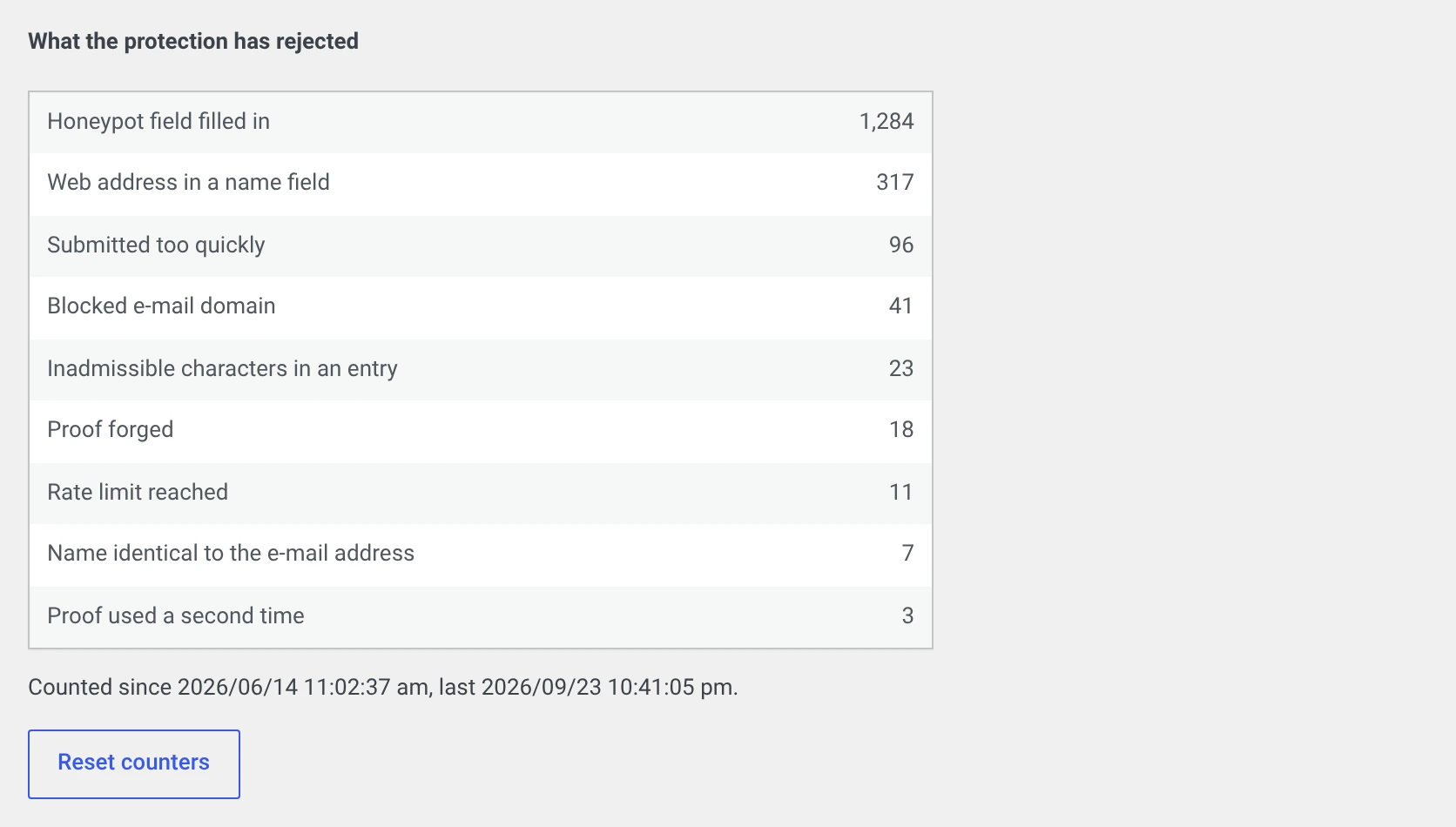
| What is at the top | What it means |
|---|---|
| Mostly honeypot filled in | Simple programs. The protection is doing its job |
| Mostly web address in a name field | Somebody wants to place links in your backend |
| A lot of submitted too quickly | Programs — or your minimum dwell time is too high |
| Rate limit reached in large numbers | A targeted rush. On to step 3 |
| Zero everywhere | Things are quiet. Leave everything as it is |
And look at the subscriber list: is anything still getting through?
Step 3: Only if necessary, the proof-of-work
Only if entries still get through despite step 1.
Proof-of-work in the background: Yes, difficulty medium.
The browser computes while the visitor fills in the form. They notice nothing; for a program trying to send a thousand sign-ups it gets expensive.
High is noticeable on an old phone. Only use it if medium is not enough.
Step 4: Block individual domains
If the entries all come from the same throwaway domain:
Blocked e-mail domains, one per line. Blocked is the domain itself and everything below it.
This treats the symptom
There are hundreds of such providers, and a new one appears every week. Block the two or three that actually show up in your installation, and do not spend more time on it.
Step 5: Tighten the rate limit
For a sustained rush:
| Setting | Default | Tighter |
|---|---|---|
| Sign-up attempts per address and hour | 3 | 2 |
| Total sign-ups per hour | 60 | 20 |
The second number hits real visitors too
If your newsletter has just been mentioned in a newspaper and a hundred people sign up within an hour, you reject everyone from the twenty-first on.
Only lower it in an emergency, and put it back afterwards.
What you should not do
Do not switch on a captcha
The captcha module with Google reCAPTCHA keeps out roughly the same things and costs you:
| Every visitor's IP address goes to Google LLC | |
| Plus device characteristics and behaviour | |
| You need consent before anything is loaded | |
| You need a section of its own in your privacy policy | |
| Some of your visitors give up because they do not want to solve the puzzle |
The spam protection does the same without any of that.
If the captcha module is running in your installation: switch the spam protection on first, try a subscription through, and then switch the captcha off. The keys stay stored.
Do not switch double opt-in off
It is the second line of defence: even if a program gets through, no active subscriber comes into being — the confirmation mail goes unanswered.
Look in occasionally and delete whatever has been waiting for confirmation for months.
Do not switch off sign-up without JavaScript
Turning off Allow sign-up without JavaScript keeps out a few more programs — and locks out screen readers, old devices and visitors with strict browser settings.
Cleaning up what is already there
- Newsletter → Subscribers, status filter Waiting for confirmation.
- Sort by date and look at what came in during the minutes concerned.
- Tick the affected rows, bulk action Delete subscribers.
For entries with a recognisable name and a plausible address: better to leave them and send the opt-in mail again. It might be a real person.
If you have your own form template
The spam protection hangs on one line in the template:
<?php $this->callMods( 'register_form' ); ?>
If it is missing from your own version under wpng_views or user_views, the
honeypot field and the time proof do not make it into the form. Nobody is
rejected because of that — only the content and the rate are checked then,
and half the effect is gone.
Look there if the protection rejects nothing although spam keeps coming in.