Reading the statistics
What the numbers say — and what they do not.
Only in the Pro and Enterprise editions
The Statistics module belongs to the paid package.
First: these are estimates, not measurements
Before you conclude anything from them, you should know how the numbers come about.
The open rate is always too low. Counting works through an invisible image in the mail. Every mail program that blocks images — and many do, out of the box — counts no open. How many that is, you do not know.
The click rate can be too high. Corporate security gateways check links before they reach the recipient. That produces clicks nobody made. With a list full of corporate addresses that can weigh heavily.
Anyone reading the text version is never counted. Neither open nor click.
What follows from that
The numbers are good for comparing your own issues: „this subject line did better than the last one." These distortions are roughly the same from issue to issue, so they cancel out.
They are not good as absolute truth and not for comparison with an industry benchmark from a blog post.
The overview
Newsletter → Statistics
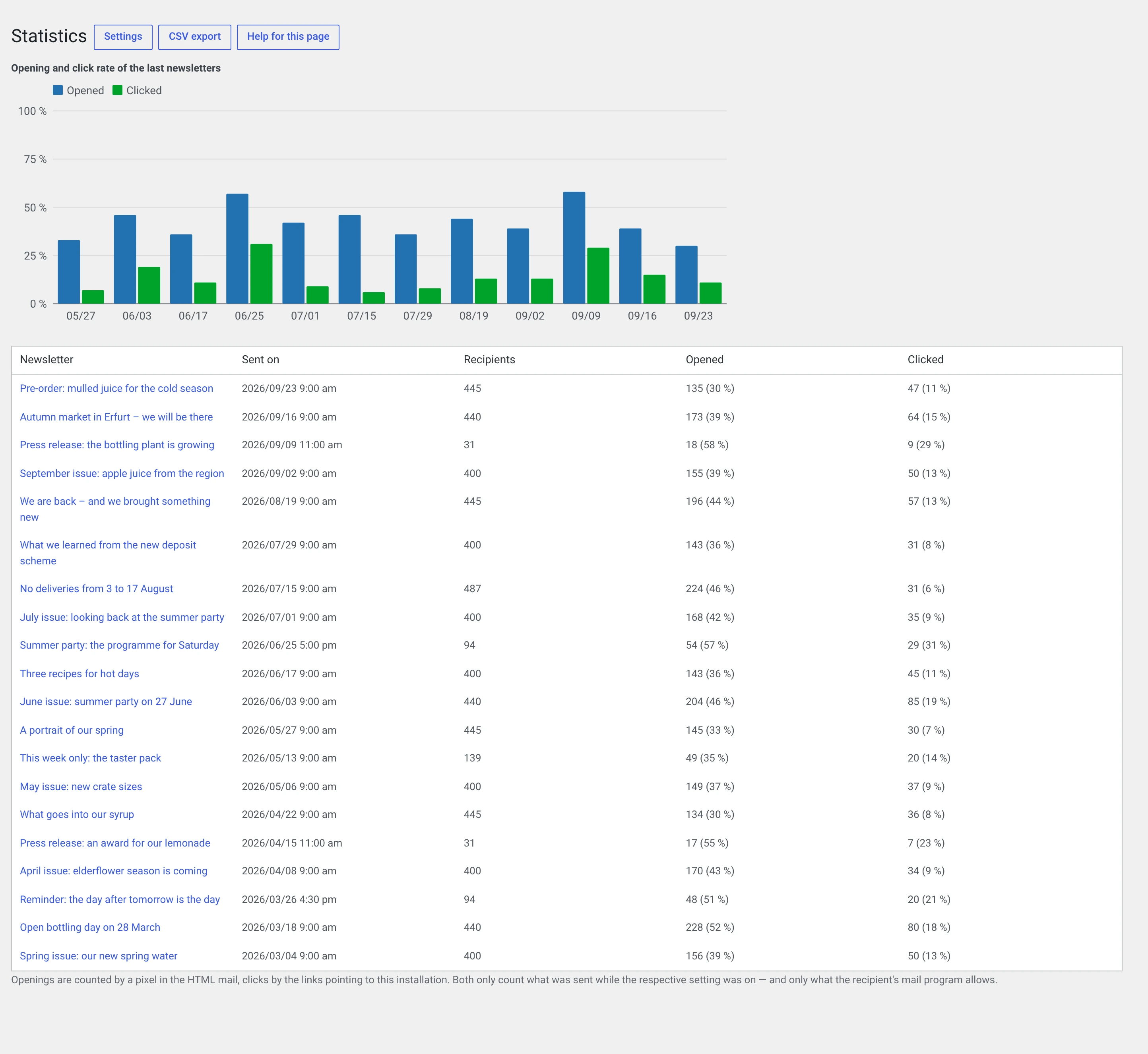
The bar chart of the last twelve issues at the top, the table below.
| Column | What it says |
|---|---|
| Recipients | How many the mail actually went out to |
| Opened | How many opened it, with a rate |
| Clicked | How many clicked at least one link, with a rate |
The one question the chart answers
Is this getting better or worse?
Do not look at individual bars but at the direction. An issue that stands out almost always has a reason you know — an announcement, a campaign, a special occasion.
A rate falling over months is the signal that matters. Possible causes, in this order:
- The list is ageing. Addresses nobody reads any more stay in the count. See Keeping the list clean.
- Deliverability is slipping. Look at the bounces — it says so in plain words.
- The content no longer hits home. The most uncomfortable explanation, and often the right one.
A single newsletter
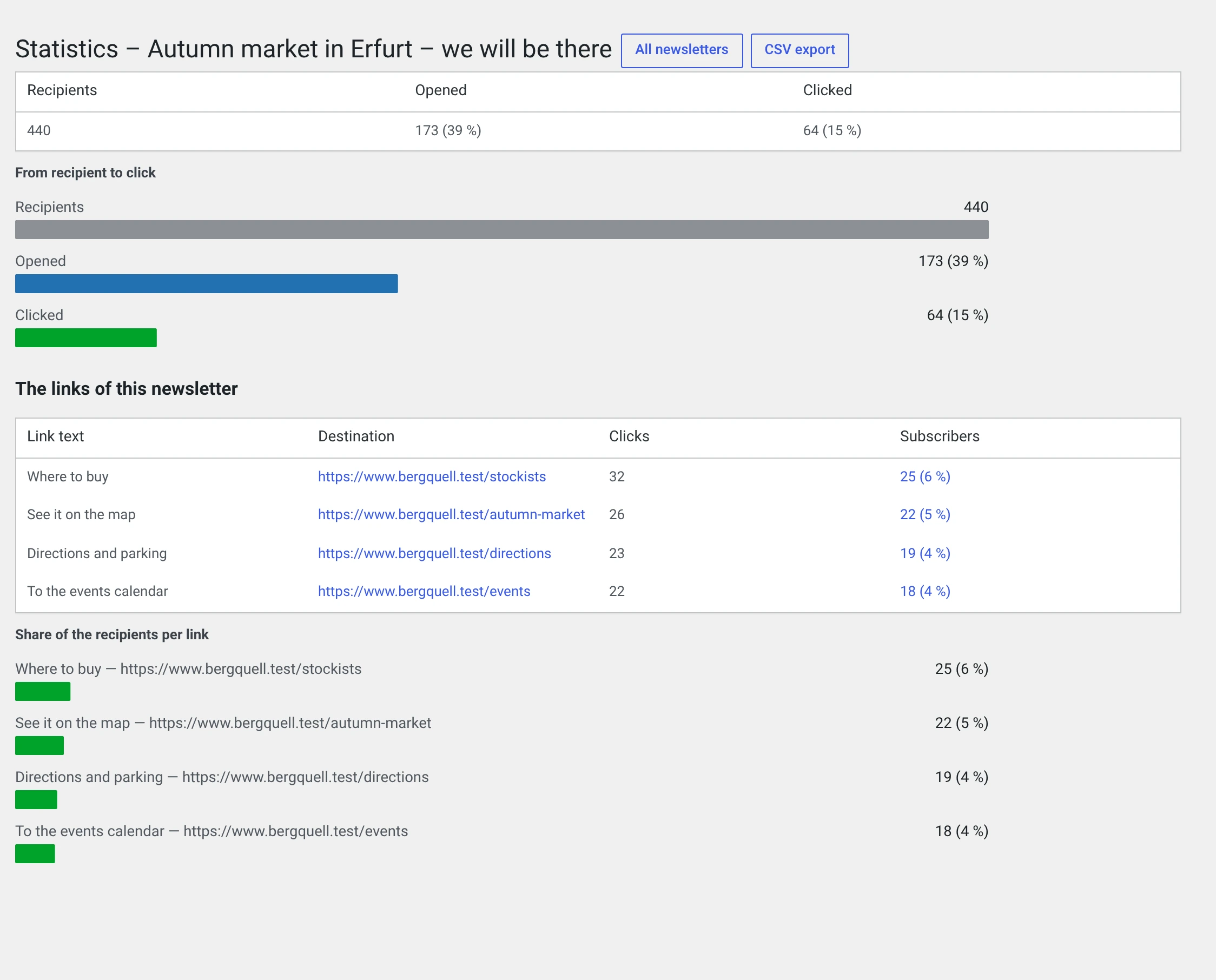
The upper part is a funnel: recipients → opened → clicked. It shows you where readers drop out.
| Where it bends | What it means |
|---|---|
| Few open | It is the sender and the subject. The content has nothing to do with it — nobody saw it |
| Many open, few click | It is the content: what you offer, or how clear the link is |
The link list
Below it are the links of this issue, sorted by clicks.
| Column | |
|---|---|
| Label | What it said in the mail |
| Target | The address |
| Clicks | All clicks, including repeated ones by the same person |
| Subscribers | How many people, and their share |
Look at the Subscribers column, not at Clicks. Ten clicks from two people are a different thing from ten clicks from ten.
What you can read from it:
- Which topic pulls. If the third link always wins, write more of that.
- Where the link should sit. The same link further up gets more clicks. That is not an insight about your readers but about your layout.
- Whether a button beats a sentence. Try it over two issues.
Old newsletters show a dash in the label
The label is read along at send time. Issues that went out before 2.0 have none — and will not get one.
Who clicked
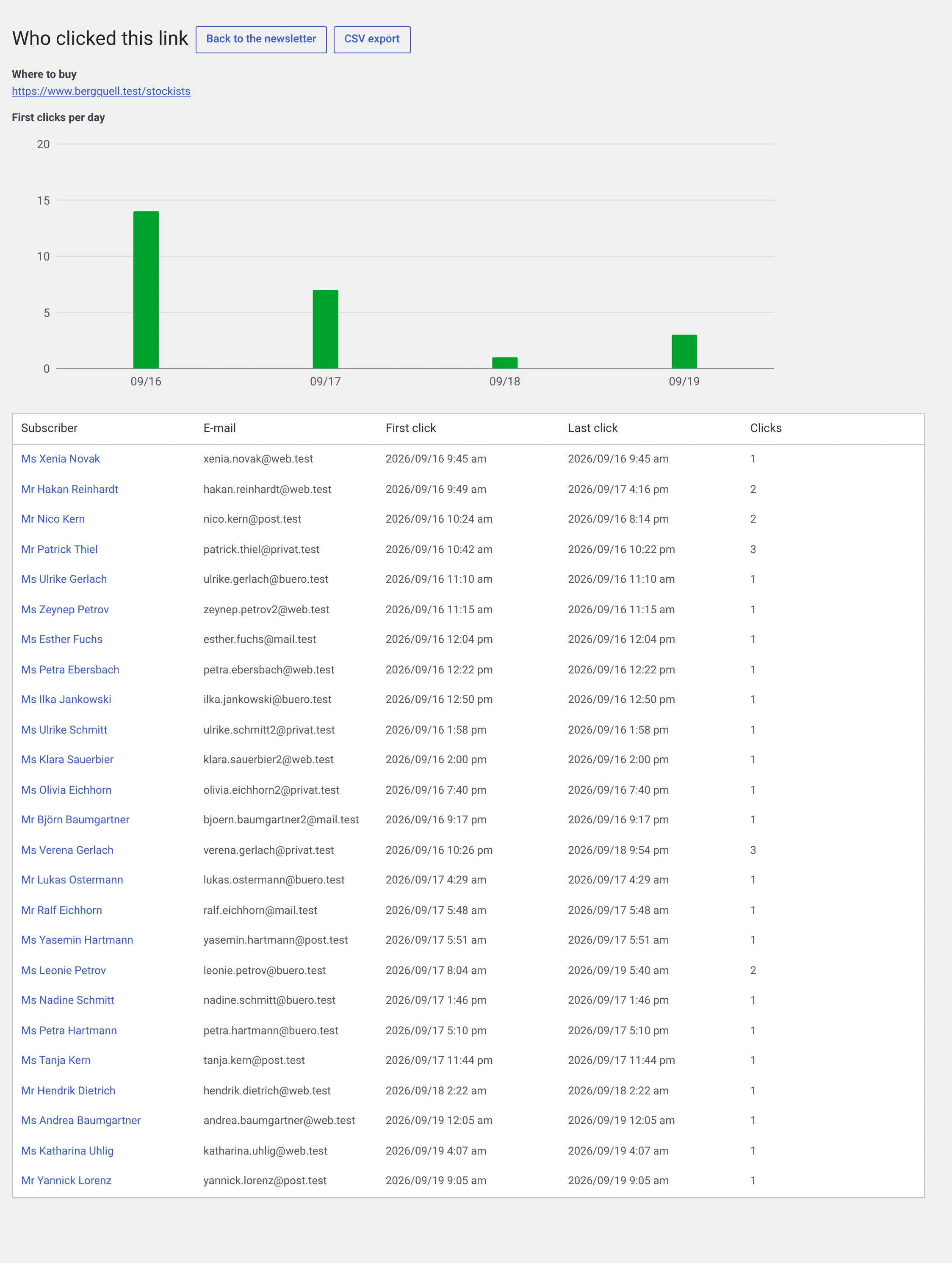
Clicking the subscriber count shows who clicked this link: name, address, first click, last click, count.
This is an evaluation of individuals
That is exactly what you need your recipients' consent for, and exactly why the measurement is off out of the box.
Consider whether you really need this view. For „which link pulls?" the totals one level up are enough.
The bar chart below shows the first clicks per day. It shows how long a newsletter lives:
| Picture | What it means |
|---|---|
| A tall bar on the first day, then almost nothing | The normal case. What is not clicked on the first day is usually not clicked at all |
| A second peak after a day or two | People catching up at the weekend or after a holiday |
| Even over weeks | The link is timeless. It may belong on your website rather than in a newsletter |
The chart ends after 90 days, the table below it does not.
What the numbers do not answer
| Question | Why not |
|---|---|
| „How many read my newsletter?" | Opened is not read. And blocked images do not count at all |
| „Is my open rate good?" | Compared to what? Your distortions are different from those behind the industry figure |
| „Why did somebody not click?" | No number says |
| „Does the newsletter bring revenue?" | That would need a connection to the shop that does not exist here |
An approach that works
- Wait for three issues before changing anything. A single number is noise.
- Change one thing per issue. Subject or send time or structure — not everything at once, otherwise you will not know afterwards what did it.
- Look at the click rate, not the open rate. A click is an action, an open is a loaded image.
- Take the CSV export and lay the rates side by side in a spreadsheet. Over twelve issues you see more than over three.
If the statistics stay empty
| Symptom | Cause |
|---|---|
| „No newsletter has been sent yet." | Is that true? Drafts do not appear in the evaluation |
| All numbers at 0 | The measurement was off at send time. A newsletter that went out before has no tracking addresses — and will not get any |
| Opens yes, clicks no | Click tracking is off, or the issue contains no outward link |
| „This newsletter has no counted links." | The same. Unsubscribe and confirmation links are never counted |
| Considerably fewer opens than expected | Is Embed images in mail on? Then nobody loads the tracking pixel any more, and nothing is counted |
The last point is the trap most people fall into. The two together do not work.