Statistics
Only in the Pro and Enterprise editions
Newsletter → Configuration → Modules → Statistics for the settings, Newsletter → Statistics for the evaluation.
Counts who opened a newsletter and who clicked which link.
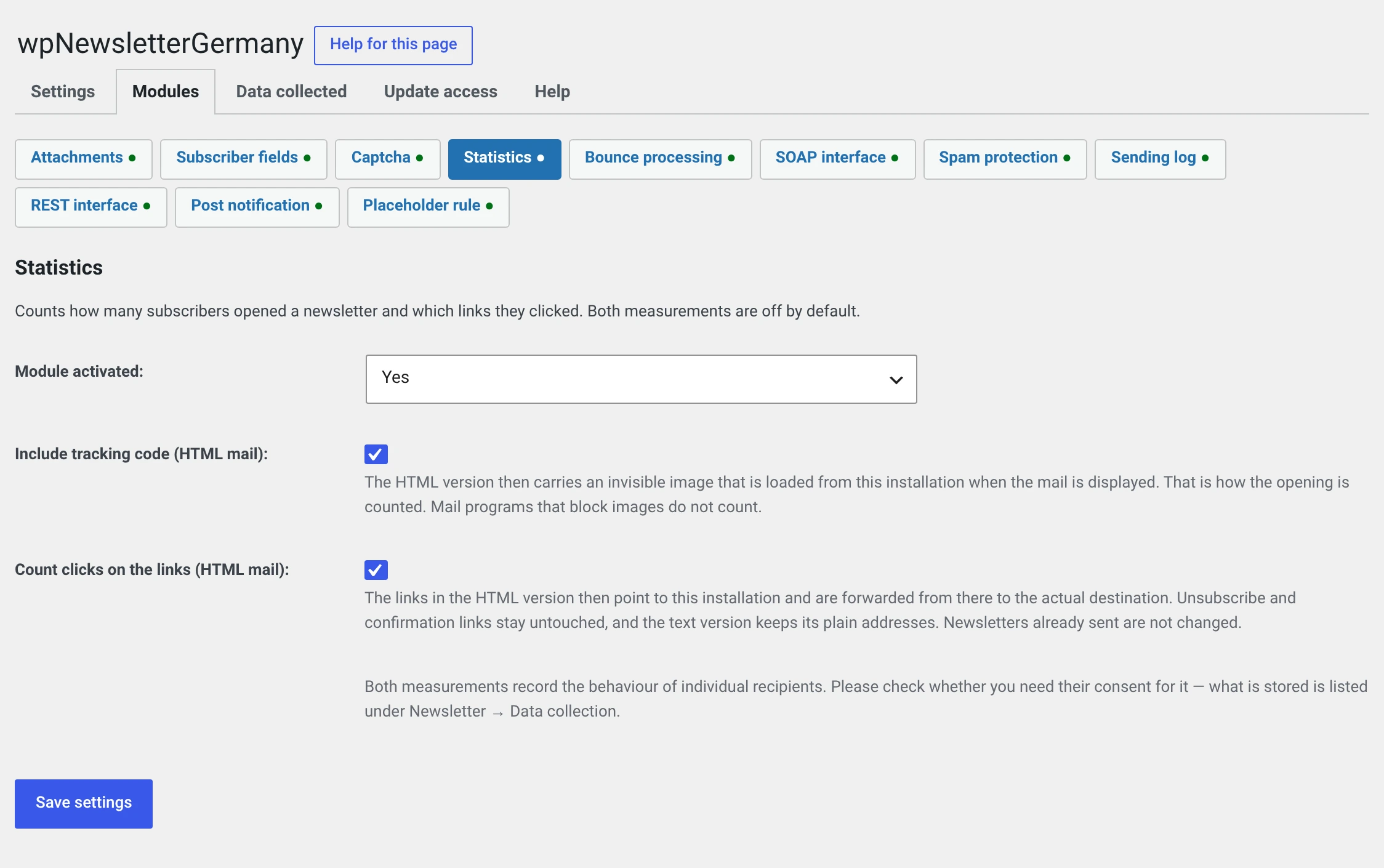
Both measurements are off out of the box — and for good reason
They record the behaviour of individual recipients, not just totals. The evaluation can say who clicked.
As a rule that requires consent, and it belongs in your privacy policy. What exactly is stored is set out in plain words under Newsletter → Configuration → Data collected, ready to adopt.
An active module by itself counts nothing — you have to switch on each of the two measurements individually.
The two settings
Integrate tracking code (HTML mail)
The HTML version gets an invisible image that is loaded from your installation when the mail is displayed. The open is counted by that.
Count clicks on the links (HTML mail)
The links in the HTML version then point at your installation and are redirected from there to the actual target.
What is stored per link and subscriber: when it was first clicked, when last, and how often. One row per click would be a movement profile, would lie around indefinitely and would answer no question that these three numbers do not answer.
What is not rewritten
| Why | |
|---|---|
| Unsubscribe and confirmation links | They differ per recipient — and the way to unsubscribe should not lead through a counter |
mailto:, tel:, anchors, relative paths |
No target to redirect to |
| The text version | A tracking address is long and meaningless. In a text mail it sits unframed in the paragraph, and anyone who has to type it out gets nowhere |
| The archive and „view in browser" | Both render without the sending hook |
If you cannot find a tracking address in your test mail
Look in the HTML version, not in the text version. There your addresses appear unchanged — that is not a bug.
The evaluation
Newsletter → Statistics. Three views, from coarse to fine.
Overview
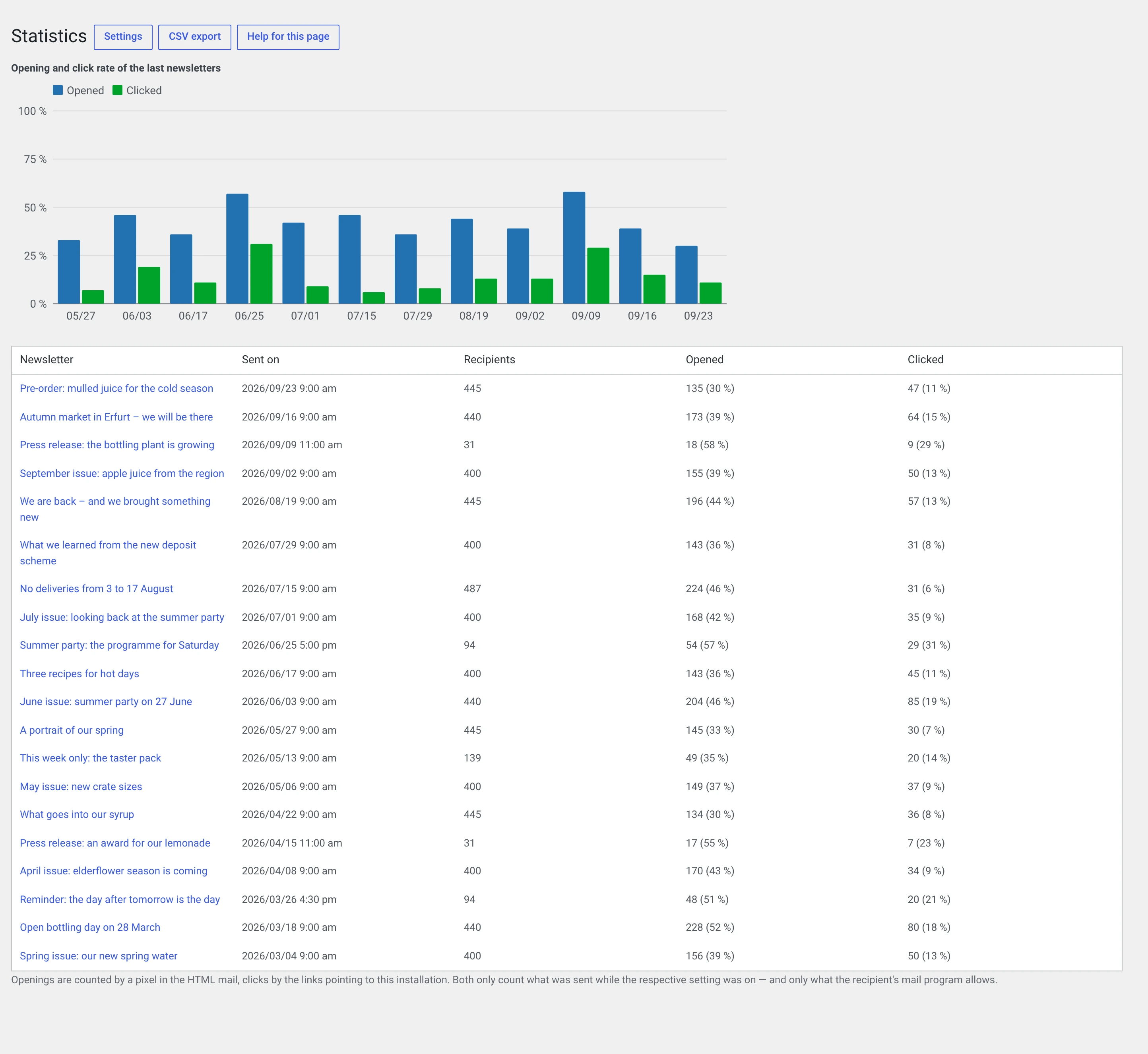
All sent newsletters with recipient count, opens and clicks, each with a rate. Above them a bar chart of the last twelve issues — the question it answers is: is this getting better or worse?
One newsletter
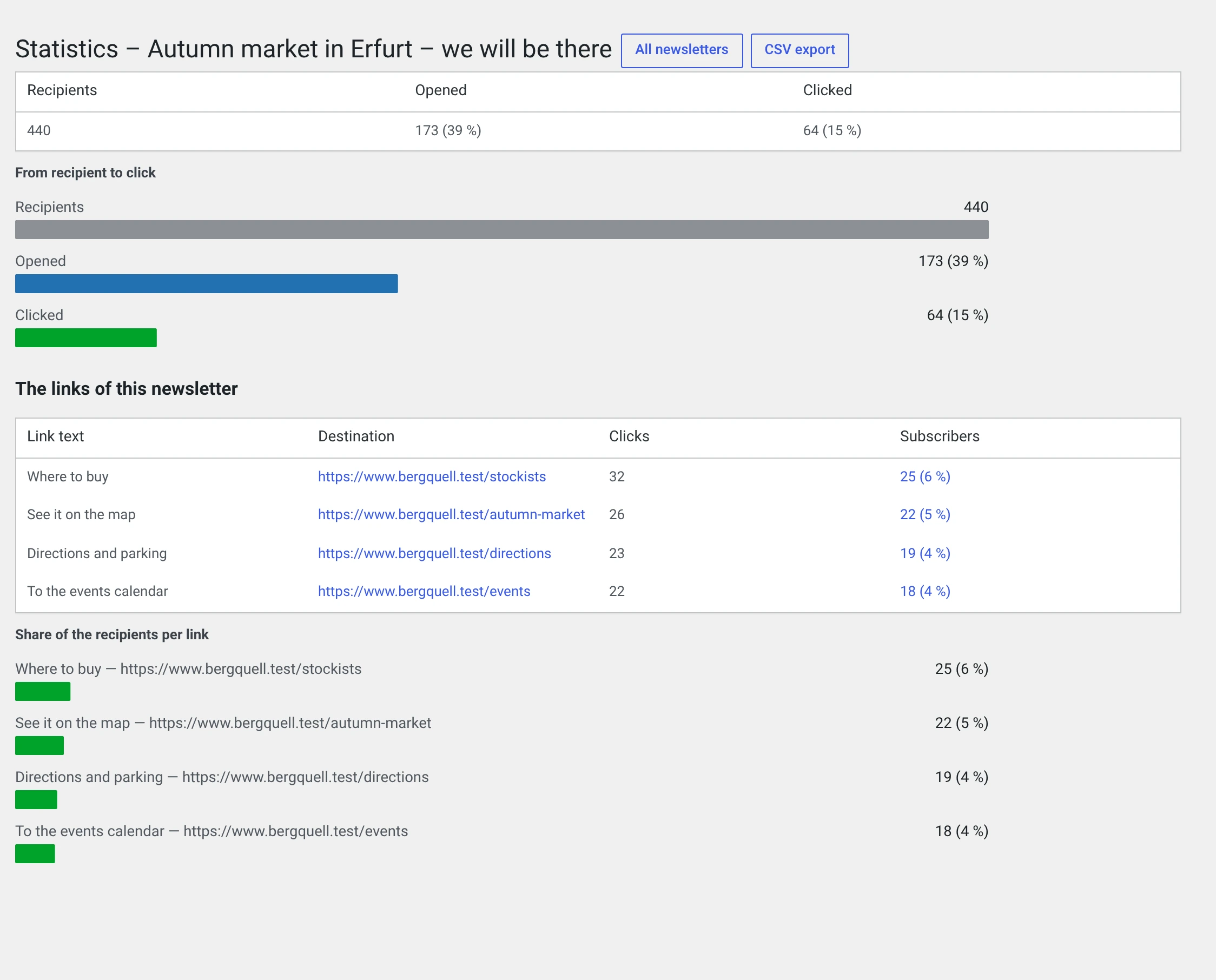
The same three numbers for one issue, as bars one below the other („from recipient to click"), and below that the links of this newsletter sorted by clicks:
| Column | |
|---|---|
| Label | What it said in the mail — the text of the link |
| Target | The address |
| Clicks | All clicks, including repeated ones by the same person |
| Subscribers | How many people, and their share of the recipients |
The label is the real gain: a list of addresses says little when two targets differ only by a parameter. If the same target appears in two places under two names, both names are in one row — what is counted is the target, not the place.
Old newsletters show a dash there
The label is read along at send time. Newsletters that went out before the change have none — and will not get one, because sent newsletters are never re-rendered.
One link
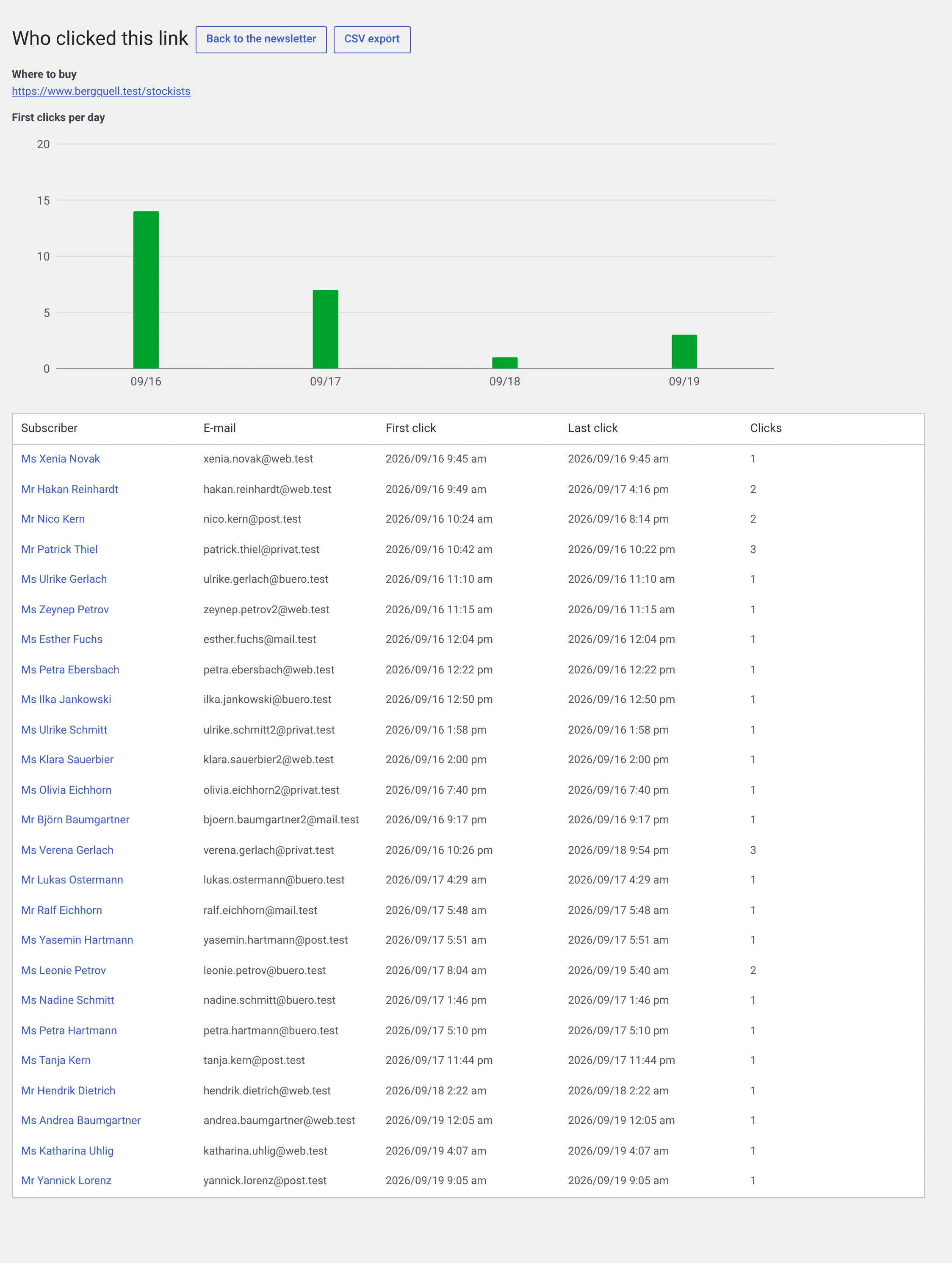
Who clicked this one link: name, address, first click, last click, count. Plus a bar chart of first clicks per day — it shows how long a newsletter lives.
The chart ends after 90 days, the table below it does not.
CSV export
Next to the heading of each of the three views. The overview exports all sent newsletters, not just the 25 on screen — an export that stops at one page is a trap.
The rates are given as numbers, not as „12 (48 %)": that way you can calculate with them in a spreadsheet.
How to read the numbers
„Clicked" means „at least one link". Not „one click". Somebody who clicks three links counts once.
The rate refers to those the newsletter actually went out to — not to the number scheduled. With zero recipients it says „0 (0 %)" without a rate: a rate out of zero recipients would claim a measurement nobody made.
The bars per link measure subscribers, not clicks. Otherwise a bar would go over 100 per cent because somebody clicked twice.
The charts add nothing that is not also in the table next to them. Where there is nothing to compare, none is drawn: a single newsletter is not a trend, a single day is not a distribution.
The limits — please read before drawing conclusions
Open rates are not a measurement, they are an estimate.
| Mail programs that block images count no open | The open rate is always too low. By how much, you do not know |
| Anyone reading the text version is never counted | Neither open nor click |
| Security gateways that check links in advance generate clicks | The click rate is too high for corporate addresses — sometimes markedly |
| Preview panes that load images count an open | Even if nobody read anything |
The numbers are therefore good for comparing your own issues — „this subject line did better than the last one". They are not good as absolute truth and not for comparison with an industry benchmark.
A newsletter that went out before you switched this on has no tracking addresses and will not get any.
If the module is switched off, the links in mails already sent keep working — only nothing is counted any more. That is deliberate: the redirect sits in the core and not in the module, precisely so that not a single link from an old mail leads nowhere.
What is stored
| What | Where | For how long |
|---|---|---|
| Time of the first and last open, number of opens | on the subscriber's delivery row | until the subscriber or the newsletter is deleted |
| First click, last click, number of clicks, per link and subscriber | own table | the same |
| The target addresses and their labels | own table, without any personal reference | with the newsletter |
No IP address, no user agent. Nothing goes outside — the redirect runs through your own installation.
The disclosure under Art. 15 GDPR through the WordPress tools names every clicked link together with the three numbers.
Why the module is called „Statistics" and the address is mod_log
The class name wpng_mod_log sits in the address of the tracking pixel in
every mail already sent. Renaming it would have meant: from the update on,
not a single previous newsletter counts any more, without a message and
without anything to see.
The name in the menu changed, the technical one did not.