Sender and subject
Newsletter → Configuration → Settings → Sender and subject
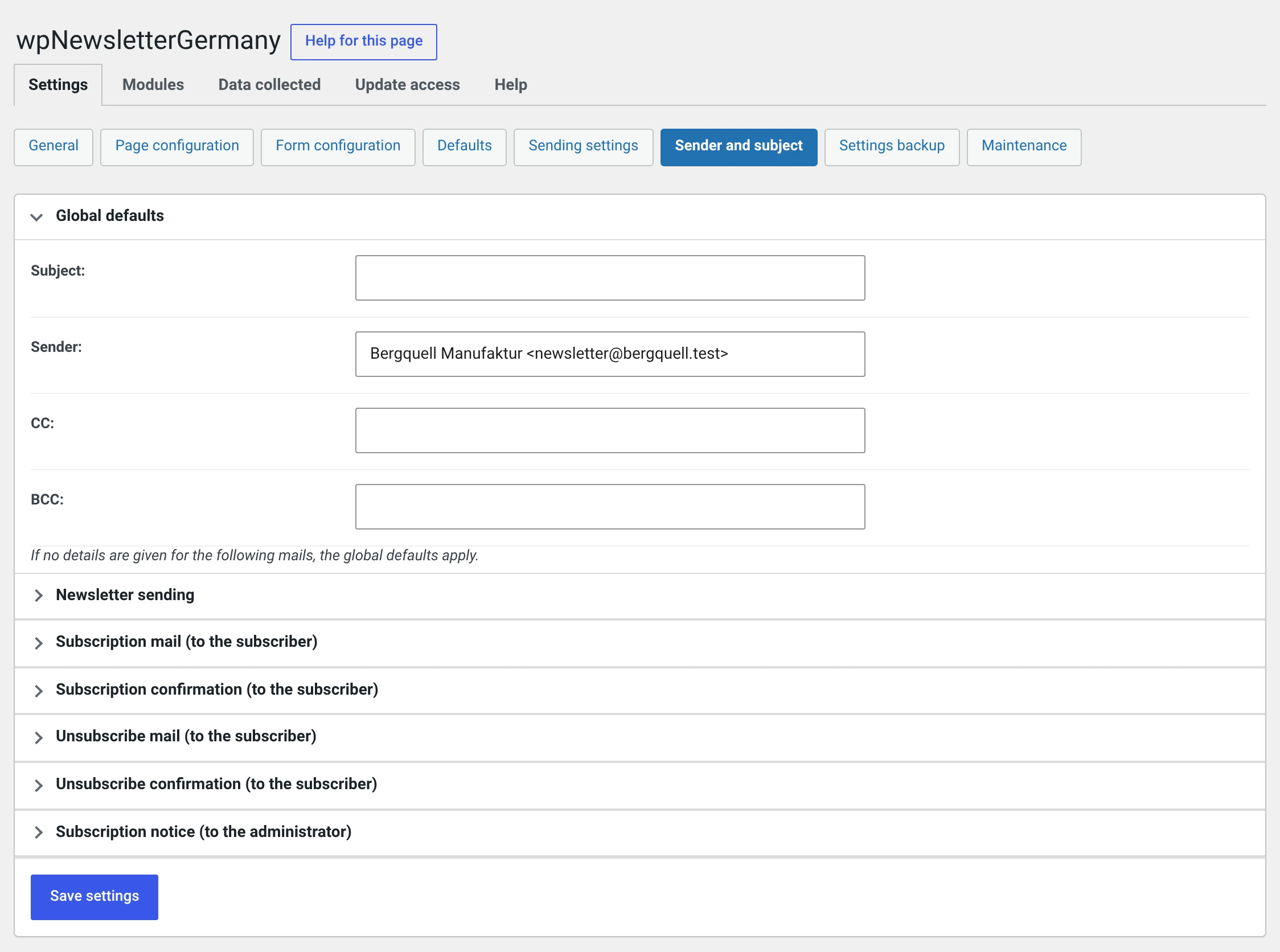
Six blocks for six kinds of mail. What is set here applies when nothing is entered in the newsletter itself.
Up to 2.0 this page was called „Mail configuration"
The name stood too close to „Sending settings" next to it, and neither of them said what was on the page. The address has stayed the same, bookmarks do not break.
How the inheritance works
Value in the individual newsletter
        ↓ if empty
Value in this mail kind's block
        ↓ if empty
Global defaults
So leaving something empty does not mean „nothing" but „whatever is one level up". For most installations it is enough to fill in the global defaults and leave everything else empty.
Global defaults
| Field | |
|---|---|
| Subject | Hardly matters: every kind of mail has a sensible subject of its own |
| Sender | The most important setting on the page |
| CC · BCC | Copies. See below |
The sender
Two notations are allowed:
newsletter@bergquell.test
Bergquell Manufaktur <newsletter@bergquell.test>
Use the second. The recipient's mailbox then shows your name and not an address.
The address must be on your own domain
A free mail address as the sender cannot be covered by SPF and DMARC. The big providers increasingly reject such mail or put it in spam — and no plugin can change that, the recipient's mail server decides.
Also set up SPF for your domain and, if your host offers it, DKIM. That is work at the host, not in the plugin, and it decides more about delivery than anything on this page.
A sender address somebody can reach
noreply@ is convenient and a mistake: anyone replying to your newsletter
does so because they want something from you. Use an address somebody
looks into.
Besides, some spam filters count noreply@ against you.
CC and BCC
| CC | Goes along and is visible to every recipient |
| BCC | Goes along, invisibly |
With a newsletter, neither is almost ever what was meant
Both apply per mail. With 400 recipients, 400 copies go to the address entered — and with CC every one of your subscribers sees that address.
If you want a copy of your newsletter, enter yourself as a subscriber in the group. That is the better way: you then see the same mail everybody else gets.
The six blocks
| Block | When this mail goes out |
|---|---|
| Global defaults | The fallback for all the others |
| Newsletter delivery | The newsletters themselves |
| Registration mail (to the subscriber) | After the form is submitted, with the confirmation link |
| Registration confirmation (to the subscriber) | After the confirmation link has been clicked |
| Unsubscribe mail (to the subscriber) | After the unsubscribe form is submitted, with the confirmation link |
| Unsubscribe confirmation (to the subscriber) | After the unsubscription has been confirmed |
| Subscription notification (to the administrator) | To you, when somebody subscribes |
Every block has subject, sender, CC, BCC — the four subscription mails additionally have the HTML mail checkbox, and the notification to the administrator also has a Recipient field.
The registration mail is the most important mail of your newsletter
It decides whether a subscription turns into a subscriber. If it does not arrive or lands in spam, the subscription is lost and nobody notices — the entry then sits in the subscriber list under Waiting for confirmation.
After setting up, walk the whole path once: enter your own address, wait for the mail, click the link. And look occasionally at how many entries are waiting for confirmation. If there are many, the mail is not getting through.
Changing the text of these mails
You do not set the text here. It lives in templates, and those can be replaced — like the layouts and like the subscription form.
There are two files per kind of mail, one for HTML and one for text:
| File | |
|---|---|
mail_register_html.php · mail_register_text.php |
Registration mail with the confirmation link |
mail_registerconfirm_html.php · …_text.php |
Registration confirmation |
mail_deregister_html.php · …_text.php |
Unsubscribe mail with the confirmation link |
mail_deregisterconfirm_html.php · …_text.php |
Unsubscribe confirmation |
mail_adminnotification_html.php · …_text.php |
Subscription notification to you |
An existing .phtml still applies
Since 2.0.2 the supplied templates end in .php — only that way can
translate.wordpress.org translate their texts. A template of your own may
carry either ending: at each location the plugin looks for the .php
first and the .phtml after it. So there is nothing to rename.
Copy the file from wp-content/plugins/…/views/mail/ to one of these
places:
| Place | |
|---|---|
<your theme>/wpng_views/mail/ |
|
wp-content/uploads/wpng/user_views/mail/ |
Survives a theme change |
Do not work inside the plugin folder
Every change there is gone with the next update.
What must remain in a version of your own
defined( 'ABSPATH' ) || exit;on the first line. Without it the file can be called directly through the browser.$this->view['confirmURL']— the confirmation link. Without it nobody can confirm any more, and all your subscriptions stay on waiting.$this->view['resetURL']— the cancel link for somebody who did not want the subscription.- The notice about data processing with the reference to your privacy policy. It is mandatory, not decoration — and it is part of what the consent record captures.
In the text version nothing is escaped for HTML: an escaped quotation mark
would sit there literally as " in the message.
After every change: try a subscription by hand and actually click the link in the mail.
Subject with placeholders
All placeholders are allowed in the subject too:
Newsletter delivery:  %nl_name%
Registration mail:    Please confirm your subscription
Notification:         New newsletter subscription: %abo_email%
No name in the newsletter's subject
Hello %abo_vorname%, our September issue reads as friendly but feels
like a mass mailing to many recipients — and for everyone without a first
name it says „Hello ,".
Recipient of the subscription notification
Out of the box, your website's administrator address. Several addresses separated by commas.
The mail itself is switched on under Form configuration — without the Notify on subscription checkbox it does not go out.