Bounce processing
Only in the Pro and Enterprise editions
Newsletter → Configuration → Modules → Bounce processing for the settings, Newsletter → Bounce for the list.
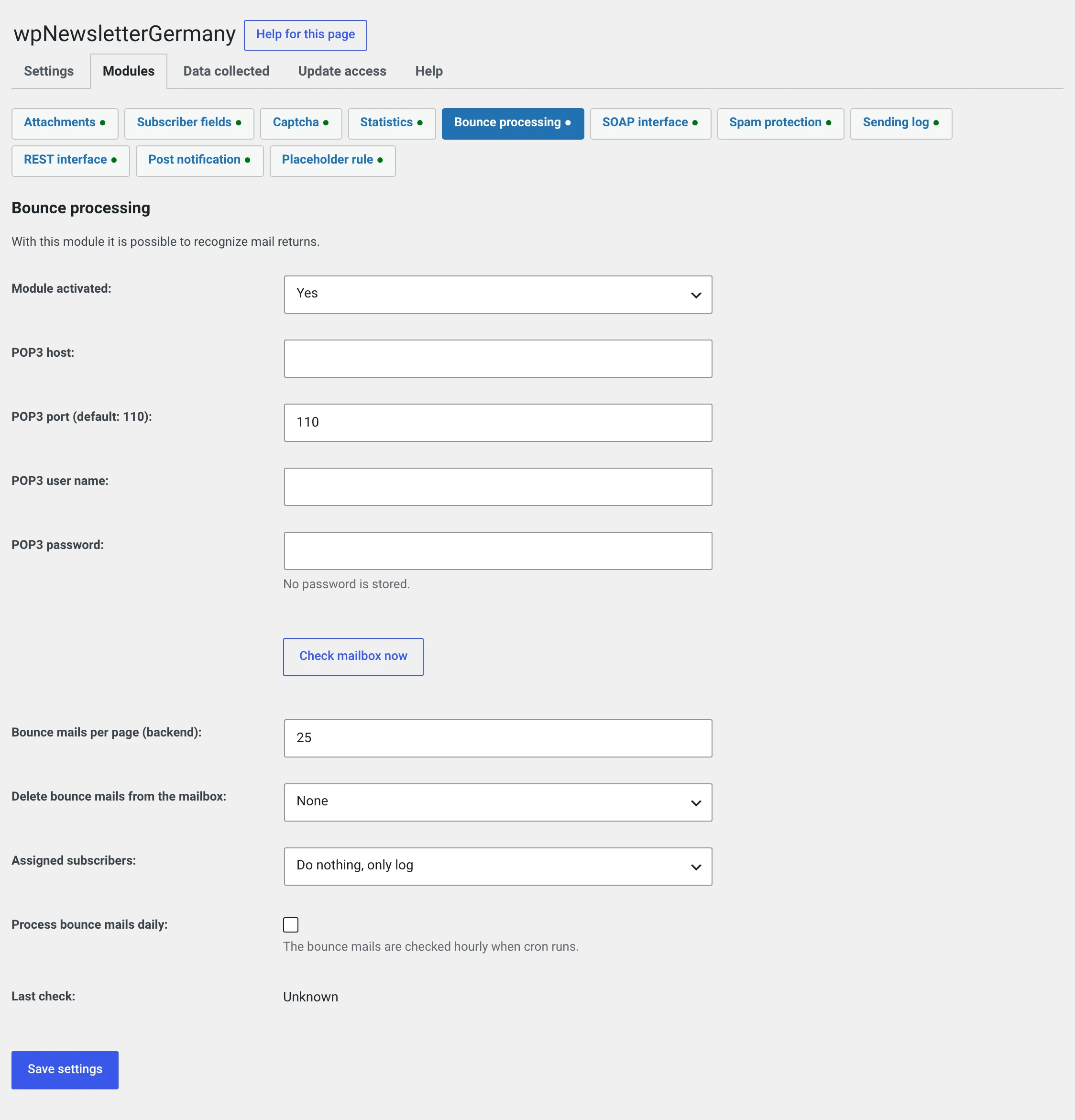
Fetches undeliverable mail from a mailbox over POP3, matches it to subscribers and takes them off the distribution list.
Why you need this once the list grows
Every address that cannot be delivered to is a signal to the recipient's mail server — and a bad one. Keep sending to dead addresses and you lose deliverability for everyone else too.
A list that is never cleaned reliably ends up in spam after a year or two.
Preparation: where the bounces go
Bounces go to your sender address. The plugin sets it as the return path of the mail; there is no separate field for it.
That determines which mailbox you have to enter here: the one for the sender address from Sender and subject — or one that address forwards to.
Two routes, both of which work:
| Route | How |
|---|---|
| A separate mailbox for the newsletter | Sender newsletter@your-domain.test, and that is exactly the mailbox you enter below |
| Forwarding | The sender stays your usual address, and your host forwards a copy to bounce@your-domain.test. You enter that mailbox |
The module deletes mail from this mailbox
Depending on the setting it tidies up, and it reads everything that is there. If your sender address is also the one people reply to, set Delete bounce mails from mailbox to None — or take the forwarding route.
Check it once
Send a test newsletter to an address that does not exist — something like
doesnotexist@your-domain.test. Then see which mailbox the bounce lands
in. That is the mailbox to enter here.
The settings
| Field | |
|---|---|
| POP3 host | The host name, e.g. mail.your-host.test |
| POP3 port | Usually 110, encrypted 995 |
| POP3 username | Usually the full mail address |
| POP3 password | Stored encrypted. The field stays empty if one is saved |
| Bounce mails per page | Length of the list in the backend |
| Delete bounce mails from mailbox | None, Every bounce mail, Every bounce mail that was matched to a subscriber |
| Matched subscribers | Do nothing, only log, Set to inactive, Delete immediately |
| Process bounce mails daily | The fetch then runs with the cron |
Check mailbox now fetches immediately — the way to test the credentials. Save first.
Connect encrypted
There is no selection field for encryption. Writing ssl:// in front of
the host name and setting port 995 gets you an encrypted connection:
Host: ssl://mail.your-host.test
Port: 995
Use it if your host offers it. Over port 110 the mailbox name and password go over the wire in clear text.
What we recommend
| Setting | Recommendation |
|---|---|
| Delete from the mailbox | Every bounce mail that was matched to a subscriber. What could not be matched stays — and you can look at why |
| Matched subscribers | Set to inactive. Not delete: a deleted entry can reappear with the next import, an inactive one is the proof |
| Process daily | On. Otherwise you have to remember |
„Delete immediately" is final
Along with the subscriber go their groups, their consent record, their delivery rows and their clicks. And a single bounce does not mean the address is dead — a full mailbox is a bounce too.
The list
Newsletter → Bounce. One row per returned mail:
| Column | |
|---|---|
| The address delivery failed for | |
| Subject | The subject of the bounce |
| Newsletter | Which one it was about — or Unknown |
| Date |
Show expands the headers and the text of the bounce. That is where it says why the mail did not arrive: „Mailbox full", „User unknown", „Message rejected as spam".
Read these texts occasionally
They are the only place where somebody tells you what is going on with your deliverability. If reports of spam classification pile up, that is a problem with your sender domain and not with the addresses.
The bulk actions let you delete mails and set subscribers to inactive.
A subscriber's bounces also appear in their own form, and a newsletter's in its form.
What the module cannot do
It does not distinguish hard from soft. „User unknown" (final) and „Mailbox full" (temporary) are treated the same. So look at the list before choosing „Delete immediately".
It only reads POP3. No IMAP. In practice that is rarely a problem — for a pure bounce mailbox, POP3 is enough.
What has to go into your privacy policy
Here there really is something to add. For every undeliverable mail the module stores:
- the e-mail address delivery failed for,
- the subject of the bounce,
- the complete headers — which contain host names and IP addresses of the mail servers involved,
- the text of the bounce,
- the time and the newsletter it was about.
A suggested wording:
If a newsletter mail comes back as undeliverable, we store the recipient address, the subject, the time and the technical headers and text of the bounce message. We use this information solely in order to remove permanently unreachable addresses from our distribution list.
The IP addresses in the headers stay — deliberately
The plugin stores IP addresses nowhere else. Here they are the addresses of the mail servers the bounce travelled through, not those of a visitor — and they are the only thing that shows why a mail did not arrive.
Under Newsletter → Configuration → Data collected the module names this explicitly instead of hiding it behind „headers of the bounce message".
Retention. The module does not tidy up by itself. When a subscriber is deleted, their bounce entries go too; with the setting on „delete subscriber", no entry is left at all. Otherwise, look in occasionally yourself.
If the fetch does not work
| Symptom | Cause |
|---|---|
| Connection fails | Host or port wrong, or your host blocks outgoing connections on that port |
| Login fails | Mailbox name or password. Usually the name is the full address |
| Connects but finds nothing | The mailbox is empty — or the bounces go somewhere else. Check which address your mail server writes into the Return-Path |
The module was non-functional up to 1.1.4
Under PHP 8 every fetch aborted — and in such a way that the whole cron run stopped, not just the module. The cause was a bundled library from 2010.
Since 2.0 the module uses the POP3 class WordPress brings along itself. If you once switched the module off because it did not work: try it again.