General
Newsletter → Configuration → Settings → General
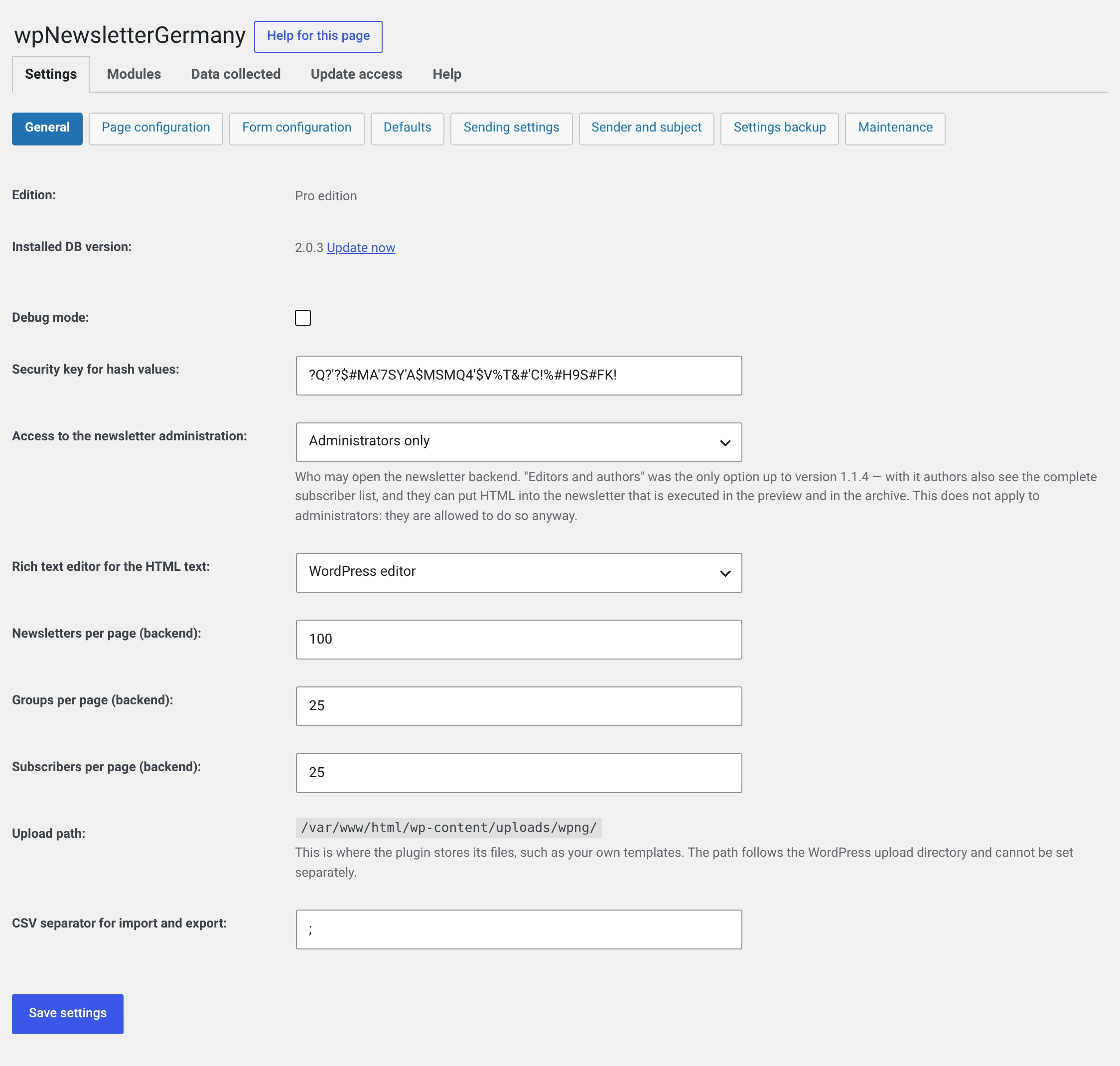
Edition
Only in the Pro and Enterprise editions
Also not a setting but a piece of information: which edition your activation key carries.
If it says „End of the update access" with a number of days instead of the edition, a deadline is running — either the trial period or the fourteen days an unregistered address gets. Both, and the way out, are explained under Update access.
Installed DB version
Not a setting but a piece of information: the version the database schema was last brought to.
If it does not match the version of the files, a red message and the link Update appear here instead of the number. That happens when somebody has swapped the files over FTP — WordPress then triggers neither the activation nor the update hook.
One click is enough. Newsletters, subscribers and groups are not touched; only the schema is brought up to date.
Debug mode
Writes additional information about sending into the error log. Meant for troubleshooting, not for production — leave it off unless you are chasing a problem together with support.
Security key for hash values
The shared key of the SOAP interface. A third-party system calling the interface signs its calls with it.
Changing it locks the other side out
The key exists on both sides. Change it here and every call from the other system fails until the same value is entered there.
It also signs the confirmation and unsubscribe links from before 2.0. Since then there has been a key of its own for that, which appears in no input field; you renew it under Maintenance.
An empty field is replaced by a new random value on the next save — up to 1.1.4 a form submitted empty could delete the key for good.
Access to the newsletter administration
Who may see and use the Newsletter menu.
| Choice | Who |
|---|---|
Administrators only (manage_options) |
Default since 2.0 |
Editors (edit_pages) |
Editors and administrators |
Editors and authors (edit_posts) |
plus authors |
Why the default has become narrower
Up to 1.1.4 there was only edit_posts. With it, every author sees the
complete subscriber list — all addresses, all names, all postal
addresses. And they can write HTML into a newsletter that is executed in
the preview and in the archive.
For administrators that is no gain, they are allowed to anyway. For an author it is one.
Existing installations keep their setting and get a message about it. If you want editors to work on the newsletter, change it here — and then you know what you are doing.
Editor for the HTML text
| Choice | |
|---|---|
| WordPress editor | Default. The editor with the Visual and Code tabs, the same one as for a post |
| Disabled | A plain text area. You write the HTML by hand |
With the WordPress editor the content runs through the same filters as a post when rendering — paragraphs are inserted, shortcodes are resolved. Without it, your HTML goes into the mail unchanged.
CKEditor is gone
Up to 1.1.4 there was a third choice here. The module was dropped in 2.0; anyone who had it configured gets the WordPress editor.
Newsletters / groups / subscribers per page
How many rows each list shows in the backend. Defaults: 100, 25, 25.
With very large lists a high value is not faster but slower — and can fail at PHP's memory limit. If a list breaks off as a white page, this is the first knob to turn.
Upload path
Information, not an input field: this is where the plugin stores attachments and your own templates. The path follows the WordPress upload directory and cannot be configured separately.
Up to 2.0 this was an input field. Nobody ever read the value.
CSV separator for import and export
Default ;. Excel with German settings expects the semicolon; if you work
with programs that expect the comma, enter , here.
Applies to the import and export of subscribers and to the CSV export of the Statistics.