Newsletters
Newsletter → Newsletter is the list of all issues — drafts, scheduled and already sent.
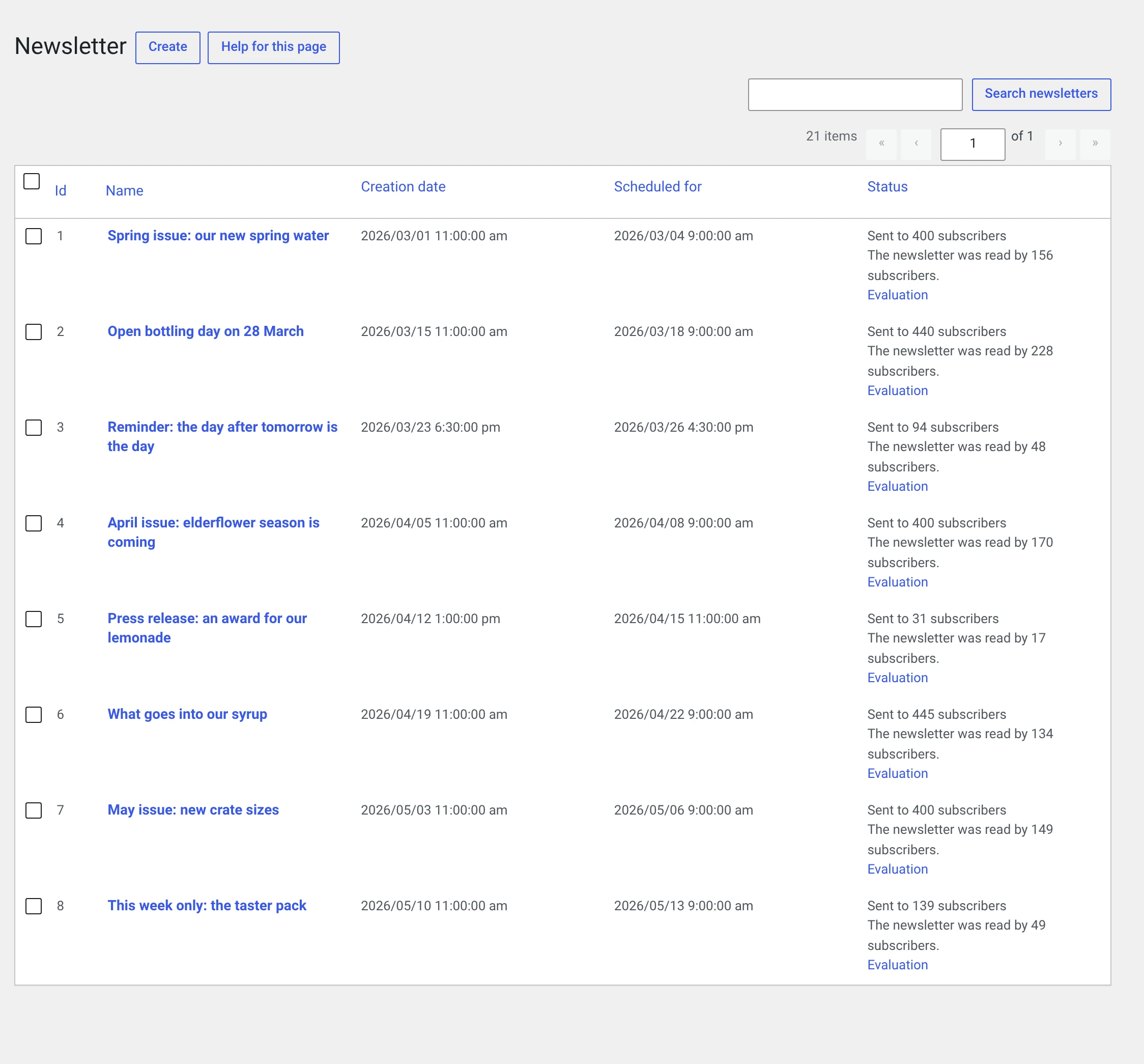
| Column | |
|---|---|
| Id | The number. It appears in addresses and in the delivery log |
| Name | The internal name. Through the placeholder %nl_name% it can appear in the mail as well |
| Creation date | When the draft was created |
| Date | When it is to be sent — „Not yet defined." as long as nothing is scheduled |
| Status | Draft, „12 / 400 subscribers have received the newsletter" while sending, „Sent to 400 subscribers" afterwards |
If the Statistics module is running, the status column also shows the number of opens and a link to the evaluation.
What you can do in the list
| Edit | Opens the form. For a sent newsletter, name and content are locked |
| View | Opens the newsletter in the browser, the way a recipient sees it. Only for sent ones |
| Copy | Creates a new draft with the same content and the same target groups. The usual way to the next issue |
| Delete | Removes the newsletter, its delivery rows, its links and their clicks |
Deleting takes the evaluation with it
Along with the newsletter go its delivery rows and every counted open and click. The evaluation of that issue is gone afterwards, including from the trend chart in the Statistics.
The three states
Draft  ──[Schedule sending]──►  scheduled  ──[Cron]──►  sent
  ▲                                  │
  └────────[Cancel sending]──────────┘
Draft. Everything is editable. It appears in no evaluation and in no archive.
Scheduled. The recipients are fixed — they are determined when you schedule and written into a queue. Anyone subscribing afterwards will not get this issue. Content and name are locked from now on.
Sent. Final. The newsletter can be viewed, evaluated and copied, but no longer changed.
Sent newsletters are never re-rendered
The rendered HTML is frozen at send time. If you later switch templates, replace your logo or change the accent colour, that changes nothing about an issue already sent — not even how it looks in the archive.
That is deliberate: what sits in the recipient's mailbox and what they read back in the browser should be the same thing.
Cancel sending / Reschedule puts a scheduled newsletter back to draft. Mails already sent stay sent — a mail cannot be recalled. The ones not yet sent will not go out.
Next
- Writing a newsletter — the form field by field
- Sending and scheduling — test send, date, queue
- Templates — the ten layouts and the accent colour
- Placeholders —
%abo_vorname%and the rest - Archive and browser view — the newsletter as a web page